Blog

  • Encounter-Sheet-Imports

    Encounter-Sheet-Imports

    Monster Imports for Shwaffle’s D&D 5e Encounter Sheet

    File Listing:

    File Name Book Title Sub-Book Titles Monster Count
    CoS Curse of Strahd 19
    EE Elemental Evil Princes of the Apocalypse 42
    MM Monster Manual 456
    MToF Mordenkainen’s Tome of Foes 140
    RoD Rage of Dragons Out of the Abyss 35
    SKT Storm King’s Thunder 31
    TftYP Tales from the Yawning Portal 26
    ToA Tomb of Annihilation 35
    ToB Tome of Beasts 48
    ToD Tyrrany of Dragons Hoard of the Dragon Queen, Rise of Tiamat 23
    Tortle The Tortle Package 6
    VGtM Volo’s Guide to Monsters 141


    v1.62 (11/18/18)

    • Fixed issue with ‘Skills’ not showing properly
    • Added in the Constitution Modifier for the hit dice due to demand

    v1.61 (7/19/18)

    This one is all bug fixes! I highly recommend deleting all previous copies to make sure you’re using this version. I would also love to know if this alerts people when I update? Is there any other way I should be alerting people? Let me know.

    • Went through and tested all monsters so none of them should error out. Please report any oddities and bugs on GitHub
    • Changed the verbiage of two-handed variant attacks in the descriptions to make it more apparent
    • Fixed a bug where some attacks wouldn’t show based on the ability
    • Small code changes for consistency

    v1.6 (7/7/18)

    This feels like a small update due to the changelog, but I think the way I reworked how you choose a monster is such a big addition that I wanted to push it out as quickly as possible. This has been something I’ve wanted to add for quite a while so it feels nice that it’s finally finished. This is the groundwork I needed to get the different lists into the sheet so let me know what you think!

    *Added an icon for Tortle Package for fun
    *Added info on how to contact me

    v1.51 (7/2/18)

    • Fixed a typo that caused Tales from the Yawning Portal not to work.


    v1.5 (6/24/18)

    Per usual I took too long with me recent update. This is a big one so I hope it makes up for the delay in the new manuals!


    I would love to have some input from users on what they think needs to be changed or added. After submitting this file, I’m going to begin work in a single page monster sheet. This will be extremely beneficial for boss level monsters that have a large traits/actions section. After that, I would like to work on an initiative order page! That sounds like a fun challange so I hope it turns out well. I appreciate everyones support and thank you for using my sheet! You can contact me at the GitHub link below, or you can message me on Reddit @ Shwaffle.


    I have also put all of the monster information up on my Github. You can view all of the data and submit errors at: https://github.com/Shwaffle/Encounter-Sheet-Imports


    Fixes

    • Fixed the font size of Speed so it’s actually readable.
    • Encounter XP was only pulling the XP from the top monster. I am very sorry for those that relied on this and were given the wrong information.
    • Previous versions of the sheet would disable form highlighting for Adobe globally. This has been fixed to re-enable form highlighting on close.
    • Fixed a lot of errors in Monster Imports

    Additions

    • Added Tome of Beasts.
    • Added Mordenkainen’s Tome of Foes.
    • Added The Tortle Package.
    • Added radio buttons at the top to select whether or not you would like Adobe’s field highlighting. I think it looks better off, but choose what you’d like!
    • Added some nice icons for the manuals you select.


    v1.4 (2/18/18)

    Fixes

    • I really, really broke actions in 1.32 somehow. This has been fixed, and I can’t believe I hadn’t noticed earlier.
    • Fixed multiple Spellcasting blocks.
    • STR mod had a 2 character limit, which broke when monsters had anything over +9 to the mod. This has been fixed.
    • Fixed a lot of data issues that weren’t properly coded.

    Additions/Changes

    • Redid the manual selections at the top, this will allow for a lot more adaptability.
    • Manually changing the ability score now modifies saves and mods.
    • Added a bunch of tooltips!
    • Added Elemental Evil (Out of the Abyss), Tyranny of Dragons (Hoard of the Dragon Queen, Rise of Tiamat), Curse of Strahd, Storm Kings Thunder, and Yawning Portal.
    • Added a lot of missing monsters, thank you to those who have let me know!
    • Added encounter name and location at the top, suggested by users!
    • Underneath the monster’s name you can now select a checkbox to manually change the name of the monster without it killing the stats. Suggested by users!
    • Added Type & Subtype if applicable!
    • You can now search for a monster name!
      • It is case sensitive
      • Adobe DC currently has a bug that makes this feature not 100% reliable. However, being able to search in the dropdown should help a significant amount with the major manuals.

    Going to be working hard to get Tome of Beasts complete before Mordenkainen’s Tome of Foes is released in May.

    v1.32 (10/20/17)

    • Split some variants into their own monsters
    • Organized spells so they display nicer
    • Trying new Clear Form buttons
    • Traits and Actions will begin to display nicer when they have multiple paragraphs
    • Skills added
    • Rest of Monster Manual added
    • Began work on allowing DMs to have initiative rolled for the monsters. Will have both singular initiative and group initiative. (The extra radio button that pops up when you choose the monster won’t do anything for now)
    • I was doing a lot of little changes and may have forgotten to patch some holes. If you find anything that breaks the sheet let me know!

    v1.31 (7/3/17)

    • Checking the radio boxes near the HP boxes will now add monster XP to the total encounter experience
    • Passive Perception and Proficiency Bonus now have their own boxes
    • Immunities and Resistances have been moved to “Creature Info”
    • Armor Type has been added, will display a shield when the creature has one wielded
    • Top of the encounter sheet has been redone. Unavailable manuals are greyed out
    • Made the ‘Clear’ buttons a little better. I don’t like the ‘Clear Form’ one, I’m thinking of what I want to change that to
    • Fixed some traits not populating correctly from Volo’s
    • Began work on encounter difficulty

    v1.3 (5/29/2017)

    • Volo’s Guide is now an option!
    • You can choose at will which manual you want to pull your monster data from. Some traits may not show correctly, but it is mostly finished.
    • Fixed INT and CON being switched in the stats columns.
    • Added an overflow page to allow for longer descriptions to be readable.

    v1.23 (5/23/2017)

    • Creature source book and stat block page added.
    • Languages will no longer show a blank line when a creature does not have language.

    v1.22 (5/13/2017)

    • Passive Perception is now included in Creature Info. I will move this into its own stat box in a future update.

    v1.21 (5/9/2017)

    • Saving throws have been fixed. Now clears all fields when you select a new creature. Leaving CLEAR buttons for now.

    v1.2 (5/8/2017)

    • Fixed +hit issue, fixed some finesse weapons using the wrong modifier

    v1.1 (5/7/2017)

    • Initial Release

    Visit original content creator repository

  • viziquer-tools

    ViziQuer Tools

    This repository contains scripts and initial data for starting your own copy of ViziQuer Tools as a set of interlinked containers.

    This repository is an integrator module + initial data; the tools themselves come from the following repositories:

    For more information on the ViziQuer tools family, please visit viziquer.lumii.lv.

    Acknowledgement

    The repository has been developed at Institute of Mathematics and Computer Science, University of Latvia,
    with support from Latvian Science Council grant lzp-2021/1-0389 “Visual Queries in Distributed Knowledge Graphs” (2022-2024).

    Requirements

    You should have a Docker-compatible environment installed (e.g. Docker Desktop, Podman, OrbStack, …).

    Any Linux server with Docker components installed will also be sufficient, either on cloud or on-premise.

    You should have some free disk space for the data and for container images.

    Before First Start

    Download this git repository, or clone it to a local directory of your choice.

    Create a file .env as a copy of sample.env, and configure it to your preferences (ports, passwords, etc.)

    Start/Stop the Tools

    Start the Tools by issuing the commands:

    cd viziquer-tools
    docker-compose up -d

    On the first start, the required images will be pulled from registries, and the databases will be populated with starter data.

    To stop the Tools, issue the command

    cd viziquer-tools
    docker-compose down

    Note: Depending on your version of container tools, instead of docker-compose ... you may need to use docker compose ....

    Using ViziQuer Tools

    ViziQuer Tools are available via any modern Internet browser via addresses http://localhost:%port%.

    The following addresses are shown assuming you used the default ports provided in sample.env

    You can connect to the ViziQuer via http://localhost:80

    You can connect to the pgAdmin via http://localhost:9001; on first start you will be asked for the password for the rdfmeta user

    The DSS instance API is available via http://localhost:9005

    The Postgres server is available at localhost:5433

    Populating the Data

    Initially, two example schemas are included: Nobel_prizes and Starwars.

    To add a schema for another endpoint, whether public or your own, follow these two steps:

    • extract the schema from the endpoint
    • import the schema into ViziQuer Tools

    Note: it is planned to automate these steps in some of the next releases.

    Alternatively, existing schemas (e.g., created on other servers) can be uploaded.

    Extracting the schema from the endpoint

    To extract a schema from an endpoint, you should use OBIS-SchemaExtractor, version 2, and follow the instructions there.

    Importing the schema into ViziQuer Tools

    Once you have obtained a JSON file with the extracted schema, you need to import this JSON file into ViziQuer Tools.

    Currently, to import the schema, use the importer module
    from the Data Shape Server repository.

    Data schema uploading

    An existing SQL database schema script (like the ones in ./db/init/pg directory) can be executed against the database instance to create a new schema.
    Manual updates of tables schemata and endpoints in the public schema are needed to make this information accessible from the visual environment
    (auto-update of these tables is performed for schemas loaded during the fresh start (restart from scratch) of the system).

    (Re)starting from scratch

    Data from the directories ./db/init/pg and ./db/init/mongo will be imported on first start of the system.

    To restart later from scratch, remove the following directories:

    • ./db/pg to restart with a fresh DSS database content
    • ./db/mongo to restart with fresh content of ViziQuer projects database

    and then restart the Tools, as in the following commands:

    cd viziquer-tools
    docker-compose down
    rm -rf db/pg
    docker-compose up -d

    (Re)starting from scratch can be used also for auto-uploading of schema scripts created elsewhere.
    For that, place the schema scripts in the ./db/init/pg folder before the fresh start of the system
    (please prefix the script file names by a unique 2-digit number, less than 99, followed by _, as, e.g., 07_).

    Updating components

    cd viziquer-tools
    docker-compose down
    docker-compose pull
    docker-compose up -d

    Uninstalling ViziQuer Tools

    Just delete the directory ./viziquer-tools with all its subdirectories.

    Note: Don’t forget to export your project data before uninstalling ViziQuer Tools.

    Visit original content creator repository

  • react-dotenv

    react-dotenv

    Warning

    This package is deprecated and archived since create-react-app is being sunsetted.

    See: https://react.dev/blog/2025/02/14/sunsetting-create-react-app

    Load environment variables dynamically for your React applications created with create-react-app.

    This will create a env.js file in your public and build directories, which will expose your environment variables you want in the global window.env variable.
    It will also take care of configuring the index.html file present in those directories to load that file.

    Installation

    npm install @ludovicm67/react-dotenv

    Usage

    Setup your project

    Create a .env file at the root of your project, with some relevant values, like this:

    API_URL=https://example.com
    SOME_OTHER_VARIABLE=foo

    Open your project’s package.json file and add:

    • the react-dotenv command to your start and build scripts.
    • the react-dotenv.whitelist property to specify which variables you need to be exposed.

    Here is an example:

    package.json:

    {
      // …other fields
    
      "scripts": {
        "start": "react-dotenv && react-scripts start", // <-- append command
        "build": "react-dotenv && react-scripts build", // <-- append command
        "test": "react-scripts test",
        "eject": "react-scripts eject"
      },
    
      // …some other fields
    
      // Add the react-dotenv configuration
      "react-dotenv": {
        "whitelist": ["API_URL"]
      }
    }

    Access environment variables from your code

    You can start the development server using the following command:

    npm run start

    Now your project have the environment variables loaded globally in the window.env property.

    You can access the environment variables from your code in two ways:

    Using the @ludovicm67/react-dotenv library (recommended)

    import React from "react";
    import env from "@ludovicm67/react-dotenv";
    
    const MyComponent = () => {
      return <div>{env.API_URL}</div>;
    };
    
    export default MyComponent;

    Using the window.env global variable

    import React from "react";
    
    const MyComponent = () => {
      return <div>{window.env.API_URL}</div>;
    };
    
    export default MyComponent;

    Known limitations

    This only supports one environment (so only one .env file) and is not meant to do more.

    Attributions

    Forked from jeserodz/react-dotenv.

    Reasons:

    • upgrade dependencies
    • use ESM
    • fix TypeScript types
    • fix the import of the env.js file in the index.html files

    Visit original content creator repository

  • Generalized-regression-neural-networks-library-from-scratch

    Generalized Regression Neural Networks (GRNN)

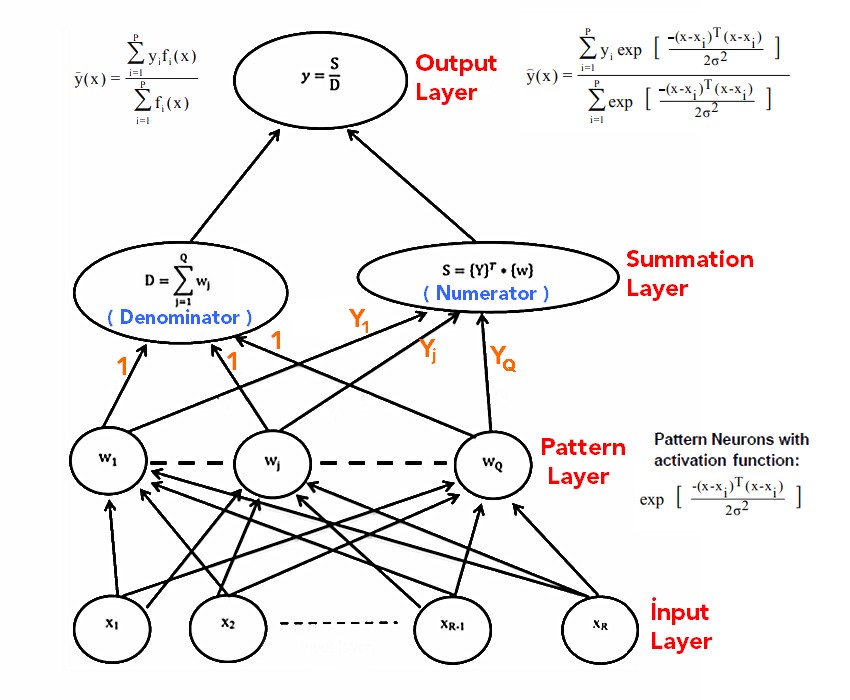
    Generalized regression neural network (GRNN) is a variation to radial basis neural networks. GRNN was suggested by D.F. Specht in 1991.GRNN can be used for regression, prediction, and classification. GRNN can also be a good solution for online dynamical systems. GRNN represents an improved technique in the neural networks based on the nonparametric regression. The idea is that every training sample will represent a mean to a radial basis neuron.[1]

    GRNN is a feed forward ANN model consisting of four layers: input layer, pattern layer, summation layer and output layer. Unlike backpropagation ANNs, iterative training is not required. Each layer in the structure consists of different numbers of neurons and the layers are connected to the next layer in turn. [2]

    • In the first layer, the input layer, the number of neurons is equal to the number of properties of the data.[3]

    • In the pattern layer, the number of neurons is equal to the number of data in the training set. In the neurons in this layer, the distances between the training data and the test data are calculated and the results are passed through the radial based function (activation function) with the σ value and the weight values are obtained.[3]

    • The summation layer has two subparts one is Numerator part and another one is Denominator part. Numerator part contains summation of the multiplication of training output data and activation function output (weight values). Denominator is the summation of all weight values. This layer feeds both the Numerator & Denominator to the next output layer.[3]

    • The output layer contains one neuron which calculate the output by dividing the numerator part of the Summation layer by the denominator part.[3]

    Algorithm-Graph

                                                   The general structure of GRNN [3]
    

    Training Procedure

    Training procedure is to find out the optimum value of σ. Best practice is that find the position where the MSE (Mean Squared Error) is minimum. First divide the whole training sample into two parts. Training sample and test sample. Apply GRNN on the test data based on training data and find out the MSE for different σ. Now find the minimum MSE and corresponding value of σ. [3]

    Advantages of GRNN

    • The main advantage of GRNN is to speed up the training process which helps the network to be trained faster.

    • The network is able to learning from the training data by “1-pass” training in a fraction of the time it takes to train standard feed forward networks.

    • The spread, Sigma (σ), is the only free parameter in the network, which often can be identified by the V-fold or Split-Sample cross validation.

    • Unlike standard feed forward networks, GRNN estimation is always able to converge to a global solution and won’t be trapped by a local minimum. [3]

    Disadvantages of GRNN

    • Its size can be huge, which would make it computationally expensive. [4]

    Example

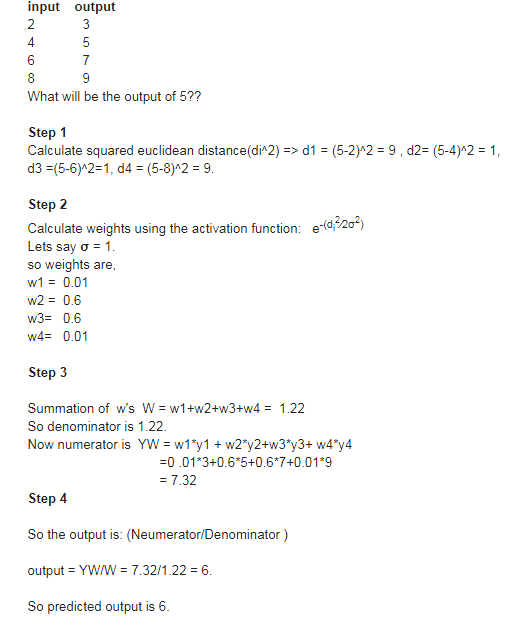
    Retrieved from [3]

    Example

    Resources

    [1] https://www.wikizeroo.org/index.php?q=aHR0cHM6Ly9lbi53aWtpcGVkaWEub3JnL3dpa2kvR2VuZXJhbF9yZWdyZXNzaW9uX25ldXJhbF9uZXR3b3Jr

    [2] https://www.journalagent.com/pajes/pdfs/PAJES_24_5_857_863.pdf

    [3] https://easyneuralnetwork.blogspot.com/2013/07/grnn-generalized-regression-neural.html

    Visit original content creator repository
  • openapi-sdk-php

    English | 简体中文

    Alibaba Cloud SDK for PHP

    Latest Stable Version composer.lock Total Downloads License codecov Travis Build Status Appveyor Build Status

    AlibabaCloud

    The Alibaba Cloud V1.0 SDK will soon enter the Basic Security Maintenance phase and is no longer recommended for use. It is suggested to use the V2.0 SDK instead.

    Release Notes

    We developed a new kernel on the principle of eliminating known issues and compatible with old grammar, adding the following features:

    Prerequisites

    Your system will need to meet the Prerequisites, including having PHP >= 5.5. We highly recommend having it compiled with the cURL extension and cURL 7.16.2+.

    Installation

    If Composer is already installed globally on your system, run the following in the base directory of your project to install Alibaba Cloud SDK for PHP as a dependency:

    composer require alibabacloud/sdk

    Please see the Installation for more detailed information about installing through Composer and other ways.

    Troubleshoot

    Troubleshoot Provide OpenAPI diagnosis service to help developers locate quickly and provide solutions for developers through RequestID or error message.

    Online Demo

    Alibaba Cloud OpenAPI Developer Portal provides the ability to call the cloud product OpenAPI online, and dynamically generate SDK Example code and quick retrieval interface, which can significantly reduce the difficulty of using the cloud API.

    Quick Examples

    Before you begin, you need to sign up for an Alibaba Cloud account and retrieve your Credentials. Before request, please Understanding the Clients, after request, please Understanding the Result.

    Currently, only some Alibaba Cloud products are supported, Supported Products, For products that are not supported, you can use Alibaba Cloud Client for PHP to initiate custom requests, and you can use Alibaba Cloud OpenAPI Developer Portal to generate Alibaba Cloud Client for PHP code online.

    <?php
    
    use AlibabaCloud\Client\AlibabaCloud;
    use AlibabaCloud\Client\Exception\ClientException;
    use AlibabaCloud\Client\Exception\ServerException;
    use AlibabaCloud\Ecs\Ecs;
    
    // Set up a global client
    AlibabaCloud::accessKeyClient('foo', 'bar')
                ->regionId('cn-hangzhou')
                ->asDefaultClient();
    
    try {
        // Access product APIs
        $request = Ecs::v20140526()->describeRegions();
        
        // Set options/parameters and execute request
        $result = $request->withResourceType('type') // API parameter
                          ->withInstanceChargeType('type') // API parameter
                          ->client('client1') // Specify the client for send
                          ->debug(true) // Enable the debug will output detailed information
                          ->connectTimeout(0.01) // Throw an exception when Connection timeout 
                          ->timeout(0.01) // Throw an exception when timeout 
                          ->request(); // Execution request
    
        // Can also Set by passing in an array
        $options = [
                       'debug'           => true,
                       'connect_timeout' => 0.01,
                       'timeout'         => 0.01,
                       'query'           => [
                           'ResourceType' => 'type',
                           'InstanceChargeType' => 'type',
                       ],
                   ];
        
        // Settings priority
        $result2 = Ecs::v20140526()
                      ->describeRegions($options)
                      ->options([
                                    'query' => [
                                        'Key'      => 'I will overwrite this value in constructor',
                                        'new'      => 'I am new value',
                                    ],
                                ])
                      ->options([
                                    'query' => [
                                        'Key' => 'I will overwrite the previous value',
                                        'bar' => 'I am new value',
                                    ],
                                ])
                      ->debug(false) // Overwrite the true of the former
                      ->request();
        
    } catch (ClientException $exception) {
        echo $exception->getMessage(). PHP_EOL;
    } catch (ServerException $exception) {
        echo $exception->getMessage() . PHP_EOL;
        echo $exception->getErrorCode(). PHP_EOL;
        echo $exception->getRequestId(). PHP_EOL;
        echo $exception->getErrorMessage(). PHP_EOL;
    }

    Issues

    Opening an Issue, Issues not conforming to the guidelines may be closed immediately.

    Changelog

    Detailed changes for each release are documented in the release notes.

    Contribution

    Please make sure to read the Contributing Guide before making a pull request.

    References

    License

    Apache-2.0

    Copyright (c) 2009-present, Alibaba Cloud All rights reserved.

    Visit original content creator repository
  • harvest_qmcpack

    master build status

    harvest_qmcpack

    Python module containing useful routines to inspect and modify qmcpack objects.

    Quick Start

    Install

    Clone the repository and add it to PYTHONPATH. To use examples, add bin to PATH.

    git clone https://github.com/Paul-St-Young/harvest_qmcpack.git ~
    export PYTHONPATH=~/harvest_qmcpack:$PYTHONPATH
    export PATH=~/harvest_qmcpack/bin:$PATH

    Prerequisites can be installed following requirement.txt

    cd ~/harvest_qmcpack; pip install --user -r requirements.txt

    You can also use pip if you do not intend to change the code

    git clone https://github.com/Paul-St-Young/harvest_qmcpack.git ~/harvest_qmcpack
    pip install --user ~/harvest_qmcpack

    To update to the newest version:

    cd ~/harvest_qmcpack
    git pull
    pip install --user --upgrade ~/harvest_qmcpack

    Tests

    Unit tests should work with either nosetest or pytest

    cd ~/harvest_qmcpack; pytest -v .

    Use

    The library functions can be used in a python script

    # extract all scalar data from a run directory 
    #  look for scalar.dat files and collect statistics
    #  hint: run dirrctory does not have to be an actual run
    import os
    from qharv.reel  import scalar_dat, mole
    from qharv.sieve import scalar_df
    """
    *** Strategy adopted in this script:
     1. use "mole" to dig up the locations of all 
      scalar.dat to be analyzed.
     2. use "reel" to reel in all scalar data 
      without prejudice.
     3. use "sieve" to remove equilibration data 
      and perform averages to shrink the database.
    only two human inputs are required: folder, nequil
    """
    
    # folder containing QMCPACK scalar.dat files
    folder = './runs'
    
    # define equilibration length and autocorrelation length
    nequil = 5
    kappa  = 1.0 # None to re-calculate
    #  runs should be designed to have short equilibration and
    # no autocorrelation. kappa can be calculated on-the-fly
    # ,be warned though: kappa calculation is slow. For nequil:
    # unfortunately I have yet to find a fast and RELIABLE
    # algorithm to determine nequil. For custom nequil, use
    # a dictionary in the `for floc in flist` loop.
    
    # generate the list of scalar.dat files to analyze
    flist = mole.files_with_regex('*scalar.dat', folder)
    
    # analyze the list of scalar.dat files
    data  = []
    for floc in flist:
      mydf = scalar_dat.parse(floc)
      mdf  = scalar_df.mean_error_scalar_df(mydf,nequil,kappa=kappa)
      assert len(mdf) == 1 # each scalar.dat should contribute only one entry
      # add metadata to identify runs
      mdf['path'] = os.path.dirname(floc)
      mdf['fdat'] = os.path.basename(floc)
      data.append(mdf)
    df = pd.concat(data).reset_index() # index must be unique for the database to be saved

    The examples in the “bin” folder can be ran in the shell

    $ stalk vmc.in.xml
    $ stab vmc.s000.scalar.dat
    $ slash-and-burn -y -v nscf
    $ rebuild_wf opt.in.xml

    Documentation

    Documentation is available on github pages.
    A local copy can be generated using sphinx (pip install --user sphinx).
    To generate the documentation, first use sphinx-apidoc to convert doc strings to rst documentation:

    cd ~/harvest_qmcpack/doc; sphinx-apidoc -o source ../qharv

    Next, use the generated Makefile to create html documentation:

    cd ~/harvest_qmcpack/doc; make html

    Finally, use your favorite browser to view the documentation:

    cd ~/harvest_qmcpack/doc/build; firefox index.html

    Examples

    Example usage of the qharv library are included in the “harvest_qmcpack/bin” folder.
    Each file in the folder is a Python script that performs a very specific task:

    • stalk: Show crystal structure specified in a QMCPACK input e.g. stalk vmc.in.xml
    • stab: Scalar TABle (stab) analyzer, analyze one column of a scalar table file, e.g. stab vmc.s000.scalar.dat
    • transplant: Backup nexus-generated folders. Allow user to select subfolders to backup. e.g. transplant graphene attic -s opt -s qmc -e will backup the QMC runs in folder “opt” and “qmc” from graphene/results and graphene/runs to attic/graphene/results and attic/graphene/runs. The “scf” and “nscf” folders will not be backed up.
    • slash-and-burn: Remove temporary files generated by Quantum Espresso.
    • rebuild_wf: Rerun QMCPACK on optimized wavefunctions, e.g. rebuild_wf opt.xml

    Description

    This module is intended to speed up on-the-fly setup, run, and analysis of QMCPACK calculations.
    The module should be used as a collection of python equivalents of bash commands.
    This module is NOT intended to be a full-fledged workflow tool.
    Please refer to nexus for complete workflow magnagement.

    Development Guidelines

    sown the seeds, inspect the crop;
    crossbreed to improve, transplant to adapt;
    reel them in, sieve for good, and refine for the best.
    — qharv maxim

    Laws of Programming (fully plagiarized from Asimov)

    1. A program may not produce wrong results or, through inaction, allow a user to produce wrong results.
    2. A program must accept manual overrides given to it by a user, except where such overrides will conflict with the First Law.
    3. A program must be as simple and as readable as possible, as long as doing so does not conflict with the First or the Second Law.

    note: the simplest way to satisfy both the First and the Second Law is to abort at an unknown request.

    Visit original content creator repository

  • self-reasoning-tokens-pytorch

    Self Reasoning Tokens – Pytorch (wip)

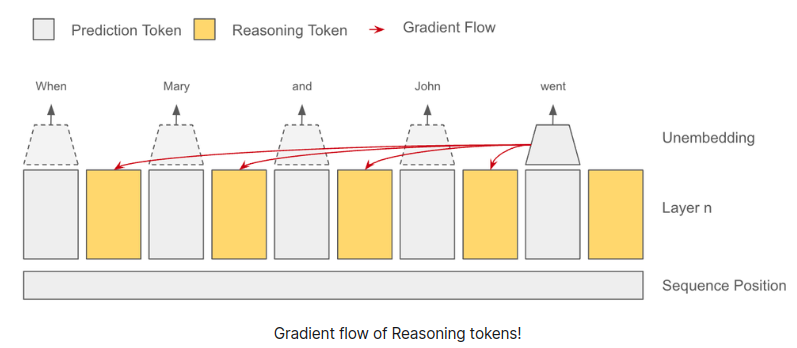
    Exploration into the proposed Self Reasoning Tokens by Felipe Bonetto. The blog post seems a bit unfleshed out, but the idea of stop gradients from next token(s) is an interesting one.

    My initial thought was to apply a stop gradient mask on the attention matrix, but then realized that the values of the “reasoning” tokens could not be stop gradiented correctly without memory issues.

    While walking the dog and meditating on this, I came to the realization that one can create independent stop gradient masks for queries, keys, values in either flash attention or a custom attention backwards, and there may be a whole array of possibilities there. If any experiments come back positive from this exploration, will build out a concrete implementation of this.

    Install

    $ pip install self-reasoning-tokens-pytorch

    Usage

    import torch
    from self_reasoning_tokens_pytorch import Transformer
    
    model = Transformer(
        dim = 512,
        depth = 4,
        num_tokens = 256,
        stop_grad_next_tokens_to_reason = True
    )
    
    x = torch.randint(0, 256, (1, 4))
    
    loss = model(
        x,
        num_reason_tokens = 4,                # number of reasoning tokens per time step
        num_steps_future_can_use_reason = 16, # say you wish for reason tokens to be only attended to by tokens 16 time steps into the future
        return_loss = True
    )
    
    loss.backward()
    
    logits = model(x, num_reason_tokens = 4)

    Or use the novel attention with ability to pass specific stop gradient masks for queries, keys, values

    import torch
    from self_reasoning_tokens_pytorch import stop_graddable_attn
    
    q = torch.randn(2, 8, 1024, 64)
    k = torch.randn(2, 8, 1024, 64)
    v = torch.randn(2, 8, 1024, 64)
    
    stop_grad_mask = torch.randint(0, 2, (8, 1024, 1024)).bool()
    
    out = stop_graddable_attn(
        q, k, v, causal = True,
        q_stop_grad_mask = stop_grad_mask,
        k_stop_grad_mask = stop_grad_mask,
        v_stop_grad_mask = stop_grad_mask
    )
    
    out.shape # (2, 8, 1024, 64)

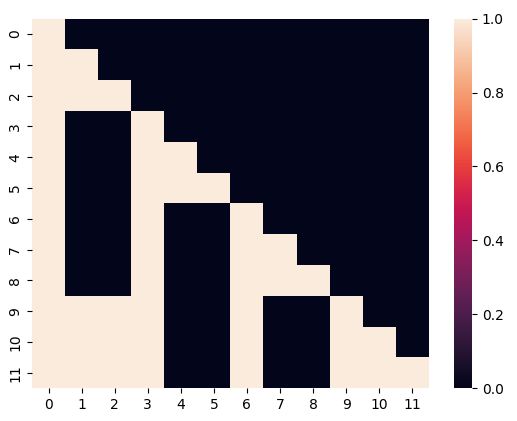
    The mask should look something like

    Todo

    • deviating from blog post, also try optimizing only a subset of attention heads by tokens far into the future

    Citations

    @misc{Bonetto2024,
        author  = {Felipe Bonetto},
        url     = {https://reasoning-tokens.ghost.io/reasoning-tokens/}
    }
    Visit original content creator repository