Blog

  • AudioGroupChat

    Audio Group Chat

    A real-time audio group chat implementation enabling voice and text communication between humans and AI agents. This project combines WebRTC, speech-to-text, text-to-speech, and LLM capabilities to create interactive conversations with AI agents.

    Features

    • Real-time audio communication using WebRTC
    • Multiple AI agents with distinct voices and personalities
    • Text-to-Speech (TTS) with customizable voice options
    • Speech-to-Text (STT) for human voice input
    • Round-robin speaker selection for balanced conversations
    • Gradio-based web interface for easy interaction
    • Support for both voice and text channels

    Prerequisites

    • Python 3.8+
    • Node.js (for frontend components)
    • Ollama (for local LLM support)

    Installation

    1. Clone the repository:

    git clone <repository-url>
    cd AudioGroupChat
    1. Create and activate a virtual environment:

    python -m venv .venv
    source .venv/bin/activate  # On Windows: .venv\Scripts\activate
    1. Install dependencies:
    pip install -r requirements.txt

    Configuration

    1. Configure Ollama settings in main_app.py:

    config_list = [{
        "model": "gemma3:1b",  # or other supported models
        "base_url": "http://localhost:11434/v1",
        "price": [0.00, 0.00],
    }]
    1. (Optional) Set up Twilio TURN server credentials for improved WebRTC connectivity:

    export TWILIO_ACCOUNT_SID=your_account_sid
    export TWILIO_AUTH_TOKEN=your_auth_token

    Usage

    1. Start the application:
    python main_app.py
    1. Open the provided Gradio interface URL in your browser (typically http://localhost:7860)

    2. Start a conversation by:

      • Speaking into your microphone
      • Typing text messages
      • Using the provided UI controls

    Project Structure

    • main_app.py: Main application entry point
    • audio_groupchat.py: Core audio group chat implementation
    • gradio_ui.py: Gradio web interface components
    • test_group_chat.py: Test cases and examples

    Voice Configuration

    The system supports multiple voice options for AI agents:

    • Energetic (fast, US English)
    • Calm (slower, US English)
    • British (UK English)
    • Authoritative (moderate speed, US English)
    • Default (standard US English)

    API Documentation

    AudioGroupChat Class

    class AudioGroupChat(GroupChat):
        def __init__(self, agents=None, messages=None, max_round=10,
                     speaker_selection_method="round_robin",
                     allow_repeat_speaker=False)

    Key methods:

    • initialize(): Set up audio processing components
    • add_human_participant(user_id): Add a human participant
    • start_audio_session(user_id): Start an audio session

    GradioUI Class

    class GradioUI:
        def __init__(self, audio_chat: AudioGroupChat)
        def create_interface(self) -> gr.Blocks

    Contributing

    1. Fork the repository
    2. Create a feature branch
    3. Commit your changes
    4. Push to the branch
    5. Create a Pull Request

    License

    This project is licensed under the MIT License – see the LICENSE file for details.

    Acknowledgments

    Visit original content creator repository

  • Han-Viet-Nhat

    Han-Viet-Nhat

    日本語に同形語が存在する漢越語 / Những từ Hán-Việt có từ đồng âm trong tiếng Nhật

    日本語 (Tiếng Việt đi theo tiếng Nyật)

    引用

    野村純太. 2020.『ベトナム語及び日本語における漢語系語彙の品詞性の対照』東京外国語大学卒業論文.

    ライセンス

    クリエイティブ・コモンズ表示4.0国際ライセンス (CC BY 4.0)

    ファイルの形式

    ID [TAB] ベトナム語 [TAB] 漢字表記 [TAB] ベトナム語品詞 [TAB] 対応日本語の有無 [TAB] 日本語読み [TAB] 日本語品詞

    • 品詞が複数ある場合、区切り記号は,
    • 対応日本語がない場合、「日本語読み」と「日本語品詞」は_(アンダースコア)

    ベトナム語品詞

    • V0, V1, V2, V3: 3人中0/1/2/3人の話者が目的語を取れると判断した動詞(自他の区別)
    • N: 名詞
    • A: 形容詞
    • Adv: 副詞

    日本語品詞

    • 自動: 自動詞(の語幹)
    • 他動: 他動詞(の語幹)
    • 自他動: 自他両用動詞(の語幹)
    • : 名詞
    • 形動: 形容動詞(の語幹)
    • : 副詞

    Tiếng Việt

    Trích dẫn

    Nomura, Junta. 2020. Betonamugo oyobi Nihongo niokeru Kangokei Goi no Hinshisei no Taisho [Đối chiếu từ loại của từ vựng gốc Hán trong tiếng Việt và tiếng Nhật]. Luận văn tốt nghiệp, Đại học Ngoại ngữ Tokyo.

    Giấy phép

    Giấy phép Creative Commons Ghi công 4.0 Quốc tế (CC BY 4.0)

    Định dạng tệp

    ID [TAB] Tiếng Việt [TAB] Chữ Hán [TAB] Từ loại trong tiếng Việt [TAB] Có từ vựng tương đương trong tiếng Nhật [TAB] Cách đọc trong tiếng Nhật [TAB] Từ loại trong tiếng Nhật

    • Trong trường hợp từ vựng có hai từ loại trở lên, dấu ngắt là ,
    • Trong trường hợp từ vựng đó không được sử dụng trong tiếng Nhật, _(gạch dưới)sẽ được hiện trong “Cách đọc trong tiếng Nhật” và “Từ loại trong tiếng Nhật”

    Từ loại trong tiếng Việt

    • V0, V1, V2, V3: 0/1/2/3 người trong 3 người bản ngữ đã khẳng định rằng động từ đó có thể có tân ngữ(phân biệt nội động từ và ngoại động từ)
    • N: danh từ
    • A: tính từ
    • Adv: trạng từ

    Từ loại trong tiếng Nhật

    • 自動: (gốc từ của) tự động từ
    • 他動: (gốc từ của) tha động từ
    • 自他動: (gốc từ của) động từ lưỡng tính
    • : danh từ
    • 形動: (gốc từ của) tính từ đuôi na
    • : trạng từ

    Visit original content creator repository

  • fubao

    푸바오: 푸른 바다로 오세요

    Alt text

    프로젝트 소개

    개발 환경

    • Management Tool

    • IDE

    • Infra

    • Frontend
      React

    • Backend

    • AI

    서비스 화면

    • 추천 컴포넌트 및 일정 등록
      X-ezgif.com-resize

    • 낚시 포인트 및 날씨 확인
      ezgif.com-resize_point

    • 일정 등록 및 AI 카메라 작동
      ezgif.com-resize_register_plan

    • AI 어종 판별 및 길이 측정
      ezgif.com-resize

    • 도감 등록
      ezgif.com-resize_collection

    • 어항
      ezgif.com-video-to-gif-converter_fish_bowl

    주요 기능

    1. 맞춤 정보 제공
      일정 등록 전, 일정 등록 후, 일정 당일에 따른 바다 낚시 입문자 맞춤 정보를 제공해준다.

    2. AI 이미지 인식
      AI 카메라를 통해 물고기 사진을 찍으면 AI를 통해 해당 어류의 어종을 판별해준다.
      또한 물고기 옆에 신용 카드 및 담뱃갑 등의 비교 물체를 놓고 사진을 찍으면 어류의 길이 측정도 동시에 해준다.

    3. 나만의 도감
      AI 카메라를 통해 판별된 어종이 도감에 자동으로 등록된다.
      도감에서 각 어종의 잡은 횟수 및 최대 길이를 확인할 수 있다.

    4. 어항
      도감에 어종이 등록되면 해당 어종의 물고기 에셋이 어항 속에 추가되고,
      어항 속을 헤엄치는 애니메이션을 볼 수 있다.

    기술 소개

    1. 어종 판별
      11,854개의 구글 크롤링 이미지 데이터셋을 MobileNet 구조의 CNN 모델로
      학습시켜 인공지능 모델 파일 생성

    2. 길이 측정

    • 어류 객체 탐지
      Object Detection API 사용
    • 카드 객체 탐지
      OpenCV Canny 사용
    1. 추천 알고리즘
      가중치 랜덤 알고리즘을 통한 사용자 설문 및 리뷰 기반 추천

    2. 홈 IoT
      Three.js를 사용해 물고기 에셋을 추가하고 블랜더 툴을 이용해 애니메이션 수정
      또한 라즈베리파이와 와이파이 모듈(ESP8266)간에 MQTT를 사용해 통신하여 조명 제어

    설계 문서

    • ERD
      image

    • Architecture
      image

    • CI/CD
      image

    팀 소개

    Alt text

    • 고광현: FE / EMBEDDED
    • 김민영: BE / INFRA
    • 김지용: 팀장 / FE
    • 박미성: AI
    • 오유진: BE / FE / PT

    카테고리

    Application Domain Language Framework
    🔲 Desktop Web ✅ AI ✅ JavaScript 🔲 Vue.js
    🔲 Mobile Web 🔲 Big Data ✅ TypeScript ✅ React
    🔲 Responsive Web 🔲 Blockchain 🔲 C/C++ 🔲 Angular
    ✅ Android App ✅ IoT 🔲 C# ✅ Node.js
    🔲 iOS App 🔲 AR/VR/Metaverse ✅ Python ✅ Flask/Django
    ✅ Desktop App 🔲 Game 🔲 Java 🔲 Spring/Springboot
    🔲 Kotlin

    Git Commit Convention

    Commit Message 구조

    커밋 메시지는 제목/본문/꼬리말로 구성

    type: Subject // 제목 body(옵션) // 본문 footer(옵션) // 꼬리말

    type : 어떤 의도로 커밋했는지를 type 에 명시(ex. feat, fix, docs)

    Subject : 제목. 코드 변경사항에 대한 짧은 요약

    body : 긴 설명이 필요한 경우, 어떻게 작성했는지가 아닌 무엇을 왜 했는지 를 작성(부연설명 혹은 커밋이유)

    footer : issue tracker ID 를 명시하고 싶은 경우에 작성

    타입(Commit Type)

    • 태그(tag) + 제목(subject) 형식
    • 첫 문자는 대문자
    • “태그: 제목” 의 형태이며, “:” 뒤에 space 가 있음에 유의[ex) Feat: buy album api (Feat 가 태그이고, buy album api 가 제목)]

    태그 종류

    • Add : 코드나 테스트, 예제, 문서등의 추가 생성이 있는경우
    • Implement : 코드가 추가된 정도보다 더 주목할만한 구현체를 완성시켰을 때
    • Design : CSS 등 사용자가 UI 디자인을 변경했을 때
    • Temp : 작업 중에 사정상 임시로 저장할 경우
    • Docs : 문서를 수정한 경우
    • Fix : 버그를 고친경우
    • Style : 코드 포맷 변경, 세미콜론 누락, 코드 수정이 없는경우
    • Refactor : 코드 리펙토링
    • Test : 테스트 코드. 리펙토링 테스트 코드를 추가했을 때
    • Rename : 파일명(or 폴더명) 을 수정한 경우
    • Remove : 코드(파일) 의 삭제가 있을 때. “Clean”, “Eliminate” 를 사용하기도 함
    • Chore : 빌드 업무 수정, 패키지 매니저 수정
    • Improve : 향상이 있는 경우. 호환성, 검증 기능, 접근성 등이 될수 있습니다.
    • Move : 코드의 이동이 있는경우
    • Feat : 새로운 기능을 추가하는 경우
    • Updated : 계정이나 버전 업데이트가 있을 때 사용. 주로 코드보다는 문서나, 리소스, 라이브러리등에 사용합니다.
    • Comment : 필요한 주석 추가 및 변경

    제목

    • 제목은 최대 50글자가 넘지 않고, 마침표 및 특수기호는 사용 금지
    • 동사(원형)를 가장 앞에 두고 첫 글자는 대문자로 표기
    • 제목은 개조식 구문으로 작성 –> 완전한 서술형 문장이 아니라, 간결하고 요점적인 서술을 의미.
    • Fixed –> Fix
    • Added –> Add
    • Modified –> Modify

    본문(Body)

    • 본문은 한 줄 당 72자 내로 작성
    • 본문 내용은 양에 구애받지 않고 최대한 상세히 작성
    • 어떻게 변경했는지 보다 무엇을 변경했는지 또는 왜 변경했는지를 설명

    꼬릿말(Footer)

    • 꼬리말은 선택사항, 이슈 트래커 ID 작성
    • “유형: #이슈 번호” 형식으로 사용
    • 여러 개의 이슈 번호를 적을 때는 쉼표(,)로 구분
    • 이슈 트래커 유형은 다음 중 하나를 사용
    1. Fixes: 이슈 수정중 (아직 해결되지 않은 경우)
    2. Resolves: 이슈를 해결했을 때 사용
    3. Ref: 참고할 이슈가 있을 때 사용
    4. Related to: 해당 커밋에 관련된 이슈번호 (아직 해결되지 않은 경우) ex) Fixes: #45 Related to: #34, #23
    Visit original content creator repository
  • symphart

    symphart

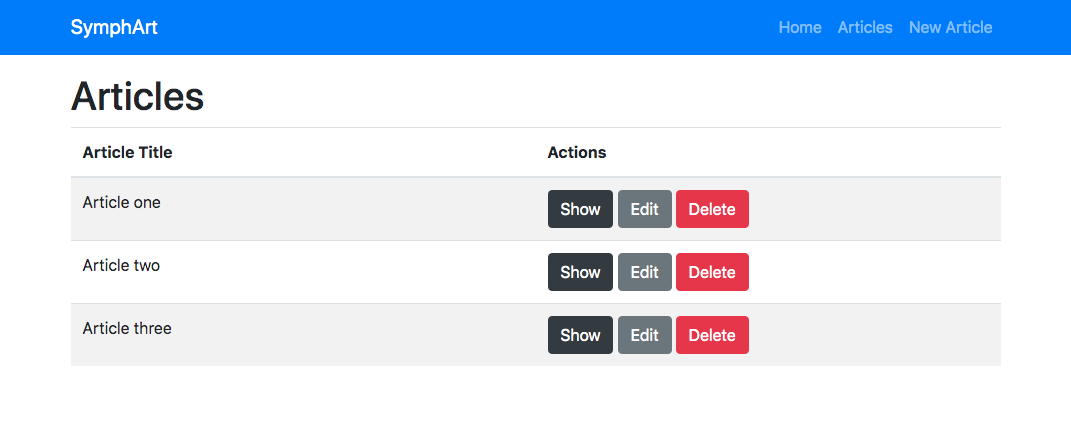
    An introduction to Symfony 4.

    Preview

    Quick Start

    Requirements: Composer & MySQL service running.

    # Install dependencies
    composer install
    
    # Create and edit the ".env.local" file and add DB params
    
    # Run in development mode
    php bin/console server:run

    Baby steps for development:

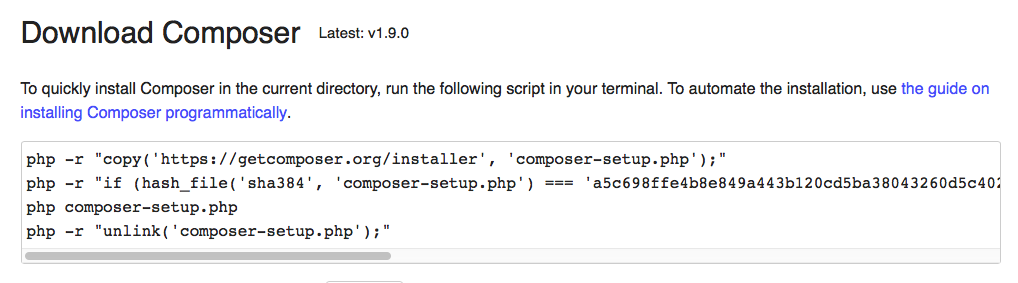
    Install Composer (globally) Composer download and install globally Composer moved to path Check with command: composer -V.

    Then navigate to directory “/Applications/XAMPP/xamppfiles/htdocs/sites” (or your public web server directory) and create a new Symfony proyect with this command: composer create-project symfony/skeleton symphart.

    NOTE: I created this project inside a folder called “sites” but you can skip that folder if you prefer create a virtual host. Another option is use “Symfony PHP web server” as described after.

    Start your web server (Apache) and load in your browser this URL: http://localhost/sites/symphart/public/

    TIP: You can create a basic .htaccess file inside “/public” folder.

    Install “Symfony PHP web server” using command: composer require symfony/web-server-bundle --dev.

    Creater your first controller:

    // src/Controller/ExampleController.php
    
    <?php
    	namespace App\Controller;
    
    	use Symfony\Component\HttpFoundation\Response;
    
    	class ExampleController {
    		public function index() {
    			return new Response('<html><body><h1>It's just an example</h1></body></html>');
    		}
    	}
    

    And define your first route:

    // config/routes.yaml
    
    index:
       path: /
       controller: App\Controller\ExampleController::index
    

    For start server in development mode: php bin/console server:run. Observe how a web server start serving your applicattion on localhost on an specific port.

    Et Voilà! You are ready to work.

    Optional development steps:

    • Install Annotations to define routes inside controllers: composer require annotations
    • Install Twig as template engine: composer require twig
    • Install Doctrine: composer require doctrine maker.
      • If you want to use a database, you must create a copy of file .env and rename as .env.local and then define your SQL credentials and database name.
      • Then execute php bin/console doctrine:database:create.
      • Now you can create entities with the command php bin/console make:entity Foo (where “Foo” will be the name of entity). You can use the same command to update an existing entity
      • Execute php bin/console doctrine:migrations:diff to create migration file. Database migrations are a way to safely update your database schema both locally and on production. Then execute the migration with the command php bin/console doctrine:migrations:migrate. Now your database will be upgrade to new structure.
      • If you edit Entity files, you need to run php bin/console doctrine:migrations:diff and php bin/console doctrine:migrations:migrate commands to sync database.
    • Install Assets manager: composer require symfony/asset
    • Install form component: composer require form

    Tips for development:

    • Examinate your routes: php bin/console debug:router
    • Execute queries to database from console: php bin/console doctrine:query:sql 'SELECT * from article'

    Resources:

    Visit original content creator repository
  • ccnn

    CCNN: Constrained Convolutional Neural Networks for Weakly Supervised Segmentation

    Deepak Pathak, Philipp Krähenbühl, Trevor Darrell

    CCNN is a framework for optimizing convolutional neural networks with linear constraints.

    • It has been shown to achieve state-of-the-art results on the task of weakly-supervised semantic segmentation.
    • It is written in Python and C++, and based on Caffe.
    • It has been published at ICCV 2015. It was initially described in the arXiv report.

    If you find CCNN useful in your research, please cite:

    @inproceedings{pathakICCV15ccnn,
        Author = {Pathak, Deepak and Kr\"ahenb\"uhl, Philipp and Darrell, Trevor},
        Title = {Constrained Convolutional Neural Networks for Weakly Supervised Segmentation},
        Booktitle = {International Conference on Computer Vision ({ICCV})},
        Year = {2015}
    }
    

    License

    CCNN is released under academic, non-commercial UC Berkeley license (see LICENSE file for details).

    Contents

    1. Requirements
    2. Installation
    3. Usage
    4. Scripts Information
    5. Extra Downloads

    1) Requirements

    1. Requirements for Caffe and pycaffe (see: Caffe installation instructions)
    2. GCC version more than 4.7
    3. Boost version more than 1.53 (recommended). If system dependencies give issues, install anaconda dependencies:

    $ conda install boost
    $ conda install protobuf
    
    1. A good GPU (e.g., Titan, K20, K40, …) with at least 3G of memory is sufficient.

    2) Installation

    1. Clone the CCNN repository

    # Make sure to clone with --recursive
    git clone --recursive https://github.com/pathak22/ccnn.git
    1. Build Caffe and pycaffe
    • Now follow the Caffe installation instructions here
    • Caffe must be built with support for Python layers!
    • In your Makefile.config, make sure to have this line uncommented
      WITH_PYTHON_LAYER := 1
    • You can download my Makefile.config for reference.

    cd ccnn/caffe-ccnn
    # If you have all caffe requirements installed
    # and your Makefile.config in place, then simply do:
    make -j8 && make pycaffe
    1. Now build CCNN

      cd ccnn
      mkdir build
      cd build
      cmake ..
      make -j8
    • Note: If anaconda is installed, then python paths may have been messed b/w anaconda and system python.
    • I usually run this command :
    cmake .. -DBOOST_ROOT=/home/pathak/anaconda -DPYTHON_LIBRARY=/home/pathak/anaconda/lib/libpython2.7.so -DPYTHON_INCLUDE_DIR=/home/pathak/anaconda/include/python2.7/ -DCMAKE_C_COMPILER=gcc-4.8 -DCMAKE_CXX_COMPILER=g++-4.8
    • To verify this do : ccmake ./ inside the build folder and manually check the following things :
      MAKE_CXX_COMPILER, CMAKE_C_COMPILER , PYTHON_EXECUTABLE , PYTHON_INCLUDE_DIR , PYTHON_LIBRARY
    • Make sure that cmake doesn’t mess the anaconda boost to system boost.
    1. Configure path (if needed) in src/user_config.py.

    2. (Optional — I don’t do it) If everything runs fine, set CMAKE_BUILD_TYPE using ccmake . to Release. This prevents eigen from checking all assertions etc. and works faster.

    3) Usage

    Demo CCNN.

    cd ccnn
    bash ./models/scripts/download_ccnn_models.sh
    # This will populate the `ccnn/models/` folder with trained models.
    python ./src/demo.py

    Train CCNN.

    cd ccnn
    bash ./models/scripts/download_pretrained_models.sh
    # This will populate the `ccnn/models/` folder with imagenet pre-trained models.
    python ./src/train.py 2> log.txt

    Test CCNN.

    cd ccnn
    python ./src/test.py  # To test IOU with CRF post-processing
    python ./src/test_argmax.py  # To test IOU without CRF

    4) Scripts Information

    Model Prototxts:

    • models/fcn_8s/ : Atrous algorithm based 8-strided VGG, described here.
    • models/fcn_32s/ : 32-strided VGG

    Configure:

    • src/config.py : Set glog-minlevel accordingly to get desired caffe output to terminal

    Helper Scripts:

    • src/extras/ : These scripts are not needed to run the code. They are simple helper scripts to create data, to prepare pascal test server file, to add pascal cmap to segmentation outputs etc.

    5) Extra Downloads

    Visit original content creator repository

  • Bibliography

      Book                   Author                    Tags                Read
      ---------------------- ------------------------- ------------------- ---------
    - Programming as Theory  Peter Naur                programming         -
      Building
    - Being and Time         Heidegger                                     -
    - Natural Categories     Eleanor Rosch             psychology research -
    - The Annotated Turing   Charles Petzold                               -
    - The Art of Computer    Donald E. Knuth                               -
      Programming I
    - The Art of Computer    Donald E. Knuth                               -
      Programming II
    - Linkers & Loaders      Morgan Kaufmann                               -
    - Principia Mathematica  Bertrand Russel, Alfred                       -
      1.                     Whitehead
    - 97 Things Every        Kevlin Henney                                 Completed
      Programmer Should Know
    - Peopleware: Productive Tom DeMarco;Timothy       software projects   Completed
      Projects and Teams     Lister
    - The Pragmatic          Andrew Hunt; David Thomas programming         Completed
      Programmer: From
      Journeyman to Master


    From the jargon file
    ====================
    
    History and "history"
    ---------------------
    
    [Levy] Hackers. Steven Levy. Anchor/Doubleday. Copyright © 1984. ISBN 0-385-19195-2. 
    [Kelly-Bootle] The Computer Contradictionary. Stan Kelly-Bootle. MIT Press. Copyright © 1995. ISBN 0-262-61112-0. 
    [Jennings] The Devouring Fungus: Tales from the Computer Age. Karla Jennings. Norton. Copyright © 1990. ISBN 0-393-30732-8. 
    [Kidder] The Soul of a New Machine. Tracy Kidder. Avon. Copyright © 1982. ISBN 0-380-59931-7. 
    [Markoff-ampersand-Hafner] Cyberpunk: Outlaws and Hackers on the Computer Frontier. Katie Hafner. John Markoff. Simon & Schuster. Copyright © 1991. ISBN 0-671-68322-5. 
    [Stoll] The Cuckoo's Egg. Clifford Stoll. Doubleday. Copyright © 1989. ISBN 0-385-24946-2. 
    Paul Dickson's “Words” (Dell, 1982, ISBN 0-440-52260-7)
     1930 Sellar & Yeatman "1066 And All That"
    
    Fiction
    -------
    
    [Vinge] True Names ... and Other Dangers. Vernor Vinge. Baen Books. Copyright © 1987. ISBN 0-671-65363-6. 
    
    Unix
    ----
    
    [Libes] Life with UNIX: a Guide for Everyone. Don Libes. Sandy Ressler. Prentice-Hall. Copyright © 1989. ISBN 0-13-536657-7. 
    
    BSD
    ---
    
    "the daemon book"
    
      The Design and Implementation of the 4.3BSD UNIX Operating System, by Samuel J. Leffler, Marshall Kirk McKusick, Michael J. Karels, and John S. Quarterman (Addison-Wesley Publishers, 1989, ISBN 0-201-06196-1)
    
      The Design and Implementation of the 4.4 BSD Operating System by Marshall Kirk McKusick, Keith Bostic, Michael J. Karels and John S. Quarterman (Addison-Wesley Longman, 1996, ISBN 0-201-54979-4) 
      
    Perl
    ----
    
    "the camel book"
    
    Programming Perl, by Larry Wall and Randal L. Schwartz, O'Reilly and Associates 1991, ISBN 0-937175-64-1 (second edition 1996, ISBN 1-56592-149-6; third edition 2000, 0-596-00027-8, adding as authors Tom Christiansen and Jon Orwant but dropping Randal Schwartz).


    Programming, Comp Sci
    -----------
    
    Jon Bentley, "More Programming Pearls" (not in bibliography)
    
    "the wizard book"
    Structure and Interpretation of Computer Programs (Hal Abelson, Jerry Sussman and Julie Sussman; MIT Press, 1984, 1996; ISBN 0-262-01153-0)
    Available: https://mitpress.mit.edu/sites/default/files/sicp/index.html
    
    "the dragon book"
    Compilers: Principles, Techniques and Tools, by Alfred V. Aho, Ravi Sethi, and Jeffrey D. Ullman (Addison-Wesley 1986; ISBN 0-201-10088-6)
    
    "the aluminum book"
    [MIT] Common LISP: The Language, by Guy L. Steele Jr. (Digital Press, first edition 1984, second edition 1990).
    
    "the Cinderella book"
    [CMU] Introduction to Automata Theory, Languages, and Computation, by John Hopcroft and Jeffrey Ullman, (Addison-Wesley, 1979).
    
    paper on "the wheel of reincarnation"
    T.H. Myer and I.E. Sutherland "On the Design of Display Processors", Comm. ACM, Vol. 11, no. 6, June 1968
    

    Visit original content creator repository

  • psbp

    Your Browsing Homepage (formerly Primo Startup Browsing Page)

    A start/home page for your favorite websites.

    Why?

    • Free and open-source.
    • Local and offline.
    • No hidden scripts.
    • Shortcut for your favorite websites, meaning your favorite and most used websites in one page.
    • Native/Pure JavaScript.
    • Files to edit/manage your favorite websites.
    • One file to add a new website.
    • Easy to customize.
    • Dark & Light mode.
    • Multiple search engines.
    • Multiple custom versions.

    Live Preview

    https://m-primo.github.io/psbp/index.html

    Google Chrome Extension

    NOT UP-TO-DATE

    https://chrome.google.com/webstore/detail/your-browsing-homepage/gankljibcichebamdgagnnncmnoacdmi

    Mozilla Firefox Extension

    NOT UP-TO-DATE

    https://addons.mozilla.org/en-US/firefox/addon/your-browsing-homepage/

    Usage

    Add Sites

    Open userSites.js, then add a code like the syntax bellow:

    new Site("Website Name", "full url with http or https", "iconname.ext", "Description (you can leave it empty)");

    For example, if you want to add Blogger:

    new Site("Blogger", "https://blogger.com", "b.png");

    DO NOT FORGET TO ADD THE IMAGE IN THIS DIRECTORY: img/site.

    To add an external icon, just add true at the end:

    For example:

    new Site("Website Name", "full url with http or https", "http://www.example.com/iconname.ext", "Description (you can leave it empty)", true);

    Just replace http://www.example.com/iconname.ext with the actual image url.

    Add Versions

    First: Create your userSites script file, and the name should be like this: version_userSites.js.

    For example, if you want to name your version personal, so the script file name should be: personal_userSites.js.

    Second: Add the websites you want in that newly created file, just like in userSites.js.

    Finally: To access the homepage with your created version, you should add ?version=version in the URL bar.

    For the above example, you should add ?version=personal in the URL bar, and it’ll load your websites you added in personal_userSites.js file. In other words, if your version is personal and the current homepage link is https://example.com, you can access it like this: https://example.com?version=personal.

    Changelog

    Changelog

    Contributing

    Pull requests are welcome. For major changes, please open an issue first to discuss what you would like to change.

    License

    MIT

    License Details

    Visit original content creator repository

  • BigDataAnalysis-RecommenderForAmazon

    Big Data Analysis and Recommdender System for Amazon

    Problem Statement:

    Perform Data Analysis on 130M+ records and build a recommender system.

    Deployed single node cluster to perform analysis using map reduce

    Carried out data analysis on big data.

    /**

    author Sayali Walke

    **/

    Dataset used for analysis:

    The Amazon Customer Reviews Dataset is a large dataset with size > 20GB.
    However, for this analysis, I’ve used a subset of this dataset named
    “amazon_reviews_us_Beauty_v1_00.tsv”

    Here’s the detailed description of dataset and its contents.

    marketplace: 2 letter country code of the marketplace where the review was written.

    customer_id: Random identifier that can be used to aggregate reviews written by a single author.

    review_id: The unique ID of the review.

    product_id: The unique Product ID the review pertains to. In the multilingual dataset the reviews for the same product in different countries can be grouped by the same product_id.

    product_parent: Random identifier that can be used to aggregate reviews for the same product.

    product_title: Title of the product.

    product_category: Broad product category that can be used to group reviews
    (also used to group the dataset into coherent parts).

    star_rating: The 1-5 star rating of the review.

    helpful_votes: Number of helpful votes.

    total_votes: Number of total votes the review received.

    Vine: Review was written as part of the Vine program.

    verified_purchase: The review is on a verified purchase.

    review_headline: The title of the review.

    review_body: The review text.

    review_date: The date the review was written.

    Apache MAHOUT

    Created a recommender system using Mahout. It serves the functionality of recommending similar products based on the similar items bought by other customers.(People who bought this….also bought this…..)

    Hadoop

    I have created a single node Hadoop cluster on virtual machine and carried out following data analysis

    using various Map-reduce Algorithms:

    1. Top 100 Products based on average of reviews: (Filtering Pattern )

    2. Average chaining and Sorting Of reviews: (Chaining and Sorting )

    3. No of reviews per product: (Numerical Summarization)

    4. Inner join on Average of reviews and no of reviews for each product(Inner Join)

    5. Customer list for each product: (Inverted Index)

    6. Created 5 bins for 1,2,3,4,5 ratings: Binning (Organization Pattern)

    7. Partitioned the data into different files for each day in 2015-08: Partitioning (Organization Pattern)

    8. Distinct Reviews Counter: (Numerical Summarization Pattern)

    9. Percentage of Helpful votes: (Numerical Summarization Pattern)

    Apache HIVE

    1. Top 10 Products based on Average ratings

    2. Most Valuable Customer based on number of products bought

    3. Most popular product based on number times product bought

    4. Number of products bought per day

    5. Number of products per ratings

    Apache Pig

    1. Number of reviews given per day.

    2. Number reviews given per product.

    Visit original content creator repository

  • supabase-graphql-example

    Supabase GraphQL Example

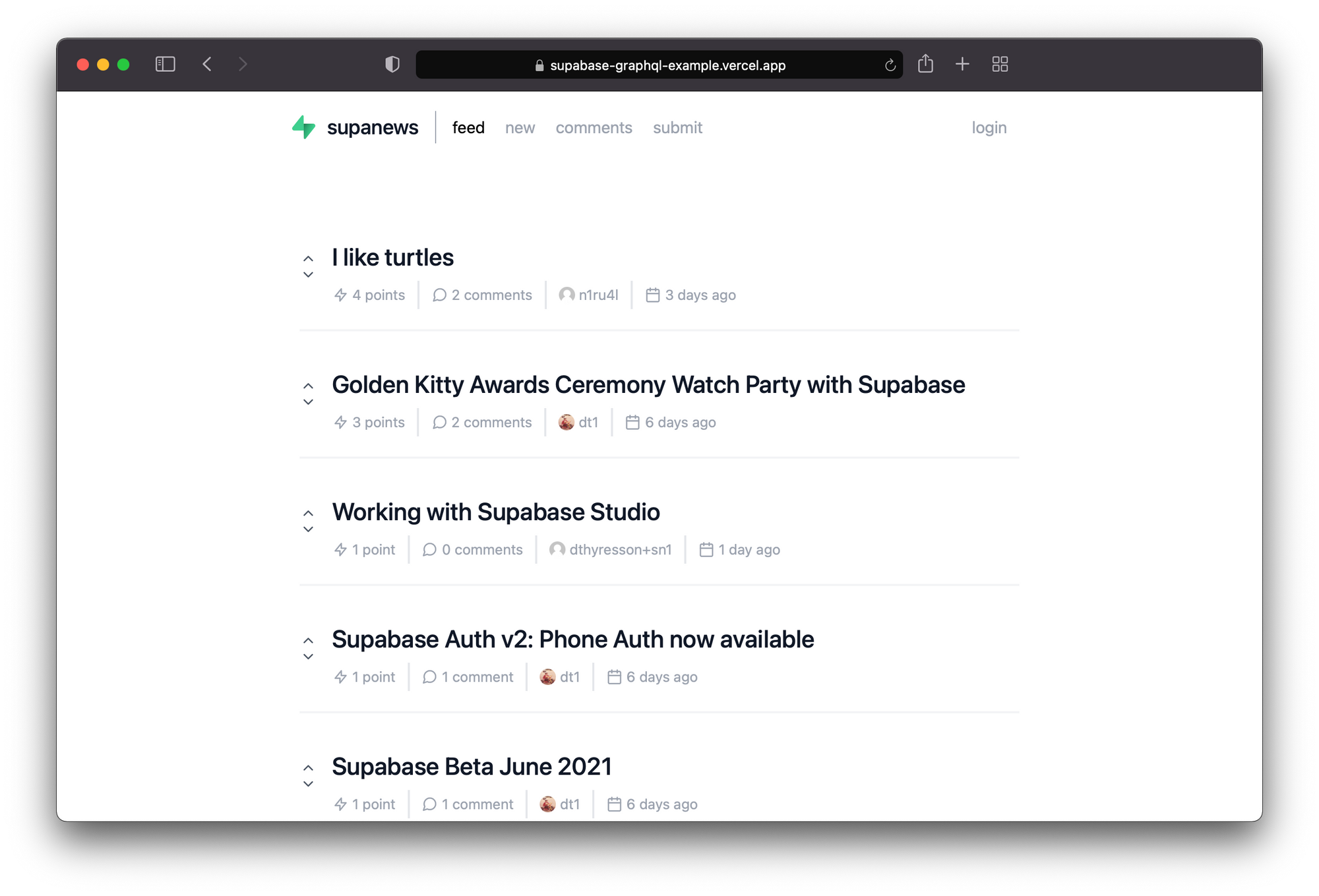
    A basic HackerNews-like clone where posts can be submitted with url links and then up and down voted.

    graphql-hn

    Showcase

    Backend

    • CRUD (Query + Mutation Operations)
    • Cursor Based Pagination
    • Authorization / Postgres Row Level Security
    • Supabase – Create a backend in less than 2 minutes. Start your project with a Postgres Database, Authentication, instant APIs, Realtime subscriptions and Storage.
    • pg_graphql – A native PostgreSQL extension adding GraphQL support. The extension keeps schema generation, query parsing, and resolvers all neatly contained on your database server requiring no external services.
    • Postgres Triggers and Postgres Functions – When votes are in, use triggers to invoke a Postgres function that calculates a post score to rank the feed
    • Postgres Enumerated Types – Enums help defined the direction of a vote: UP or DOWN.

    Frontend

    • Next.js – React Framework
    • TypeScript – TypeScript is a strongly typed programming language that builds on JavaScript, giving you better tooling at any scale.
    • graphql-code-generator – Generate code from your GraphQL schema and operations with a simple CLI
    • gql-tag-operations-preset – This code gen preset generates typings for your inline gql function usages, without having to manually specify import statements for the documents
    • urql – A highly customizable and versatile GraphQL client
    • Gravatar – Default avatar profile images from Gravatar

    Functionality

    • Registration
    • Get a ranked feed of posts
    • Create Post
    • Delete Post
    • Create Comment
    • Delete Comment
    • Upvote/Downvote Post
    • View Profile (Account)
    • View Profile (Public)
    • Pagination (Posts, Comments)

    QuickStart

    Setup env vars

    Install dependencies, GraphQL codegen, run app

    yarn
    yarn codegen
    yarn workspace app dev

    Deploy to Vercel

    Provide the following settings to deploy a production build to Vercel:

    • BUILD COMMAND: yarn codegen && yarn workspace app build
    • OUTPUT DIRECTORY: ./app/.next
    • INSTALL COMMAND: yarn
    • DEVELOPMENT COMMAND: yarn codegen && yarn workspace app dev --port $PORT

    Development

    1. Fetch latest GraphQL Schema
    yarn codegen:fetch
    1. Generate Types and Watch for Changes
    yarn codegen:watch
    1. Run server
    yarn workspace app dev

    Synchronize the GraphQL schema

    Note: You need to call select graphql.rebuild_schema() manually to synchronize the GraphQL schema with the SQL schema after altering the SQL schema.

    Manage Schema with dbmate

    1. brew install dbmate
    2. Setup .env with DATABASE_URL
    3. Dump Schema
    cd data
    dbmate dump
    

    Note: If pgdump fails due to row locks, a workaround is to grant the postgres role superuser permissions with ALTER USER postgres WITH SUPERUSER. After dumping the schema, you should reset the permissions using ALTER USER postgres WITH NOSUPERUSER. You can run these statements in the Superbase Dashboard SQL Editors.

    Schema (Public)

    • Profile belongs to auth.users

    • Post

    • Comment belongs to Post and Profile

    • Vote belongs to Post (can have a direction of UP/DOWN)

    • direction enum is “UP” or “DOWN”

    Constraints

    • Post url is unique
    • Vote is unique per Profile, Post (ie, you cannot vote more than once — up or down)

    See: ./data/db/schema.sql

    Note: The schema includes the entire Supabase schema with auth, storage, functions, etc.

    Seed Data

    A data file for all Supabase Blog posts from the RSS feed can be found in ./data/seed/blog_posts.csv and can be loaded. Another file for comments is available as well.

    Note: Assumes a known profileId currently.

    GraphQL Schema

    See: ./graphql/schema/schema.graphql

    Example Query

    See: ./graphql/queries/

    Use: https://mvrfvzcivgabojxddwtk.supabase.co/graphql/v1

    Note: Needs headers

    
    Content-Type: application/json
    apiKey: <supabase_anon_key>


    GraphiQL

    GraphiQL is an in-browser IDE for writing, validating, and testing GraphQL queries.

    Visit http://localhost:3000/api/graphiql for the Yoga GraphiQL Playground where you can experiment with queries and mutations.

    Note: Needs headers

    
    Content-Type: application/json
    apiKey: <supabase_anon_key>


    Note: In order for the RLS policies authenticate you, you have to pass an authorization header (see example):

    authorization: Bearer <access_token>


    Ranked Feed

    query {
      rankedFeed: postCollection(orderBy: [{ voteRank: AscNullsFirst }]) {
        edges {
          post: node {
            id
            title
            url
            upVoteTotal
            downVoteTotal
            voteTotal
            voteDelta
            score
            voteRank
            comments: commentCollection {
              edges {
                node {
                  id
                  message
                  profile {
                    id
                    username
                    avatarUrl
                  }
                }
              }
              commentCount: totalCount
            }
          }
        }
      }
    }

    Row Level Security Matrix (RLS)

    You can query all policies via: select * from pg_policies.

    See: Row Level Security Matrix (RLS)

    Read More

    Troubleshooting

    1. dbmate can create schema_migrations tables in schemas. To make sure they are not included in your GraphQL Schema:
    revoke select on table public.schema_migrations from anon, authenticated;
    1. To enable inflection
    comment on schema public is e'@graphql({"inflect_names": true})';
    1. Try the heartbeat to see if pg_graphql can access requests
    select graphql_public.graphql(
    	null,
    	$$ { heartbeat }$$
    )
    

    Returns:

    { "data": { "heartbeat": "2022-07-28T17:07:07.90513" } }
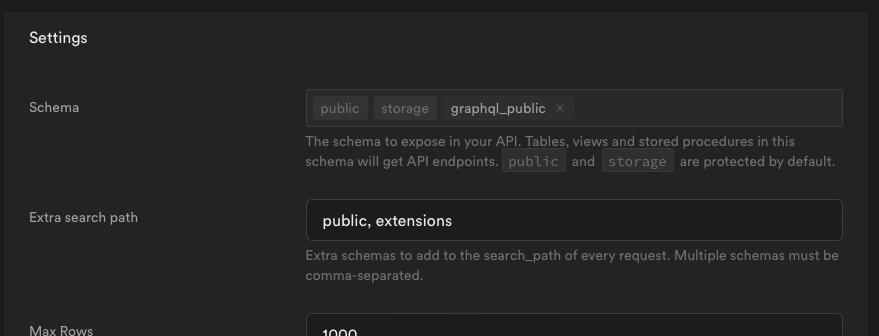
    1. Is the public_graphql schema not exposed properly?

    Getting an 406 status or error message like:

    {
        "message": "The schema must be one of the following: public, storage"
    }
    

    Then be sure to expose the graphql_public in Settings > Project settings > API.

    The schema to expose in your API. Tables, views and stored procedures in this schema will get API endpoints.

    image

    Visit original content creator repository
  • Geospatial-Analysis

    Geospatial-Analysis

    Objective

    The basic idea of analyzing the Zomato dataset is to get a fair idea about the factors affecting the establishment of different types of restaurants at different places in Bengaluru. This Zomato data aims at analyzing demography of the location. Most importantly it will help new restaurants in deciding their theme, menus, cuisine, cost, etc for a particular location. It also aims at finding similarity between neighborhoods of Bengaluru on the basis of food.

    Problem Statement

    Observations on the following are made:

    1. Top restaurant chains in Bangaluru
    2. How does the price differ between restaurants that accept online orders and those that don’t?
    3. How many restaurants offer table reservations compared to those that do not?
    4. Types of restaurants available
    5. Top-rated restaurants
    6. Restaurants located at various locations around Bangalore
    7. Approximate cost for 2 people
    8. How does the vote on restaurants accepting online orders compare to those refusing to accept them?
    9. In what restaurant does the most costly rate for two people exist? What is the dish involved? The most popular dish to eat there?
    10. Top ten most expensive and cheapest restaurants, based on an estimate for two people
    11. Restaurants under 500 (budget hotels)
    12. Budget-friendly restaurants with rating >4
    13. Overall number of restaurants that have ratings >4 and are under budget (less than 500)
    14. Hotels at various locations with affordable rates
    15. Foodie’s hotspots
    16. Heatmap of North Indian and South Indian restaurants
    17. Chains with the most popularity for casual dining
    18. Favorite dishes in various cuisines represented by a word cloud

    Dataset

    The dataset contains 17 columns as shown below:

    • url – url of the restaurant in the zomato website
    • address – address of the restaurant in Bengaluru
    • name – name of the restaurant
    • online_order – whether online ordering is available in the restaurant or not
    • book_table – table booking option available or not
    • rate – overall rating of the restaurant out of 5
    • votes – total number of rating for the restaurant as of the above mentioned date
    • phone – phone number of the restaurant
    • location – neighborhood in which the restaurant is located
    • rest_type – restaurant type
    • dish_liked – dishes people liked in the restaurant
    • cuisines – food styles, separated by comma
    • approx_cost(for two people) – approximate cost of meal for two people
    • reviews_list – list of tuples containing reviews for the restaurant
    • menu_item – list of menus available in the restaurant
    • listed_in(type) – type of meal
    • listed_in(city) – neighborhood in which the restaurant is listed

    Data Analysis Using Python

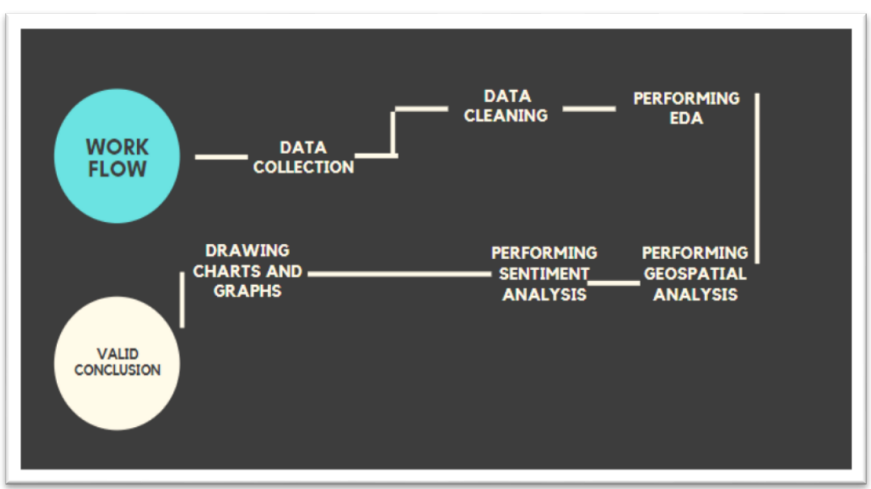
    Work flow of process:

    1. Data Collection
    2. Data Cleaning
    3. Performing EDA
    4. Performing Geospatial Analysis
    5. Performing Sentiment Analysis

    image

    Data Collection

    • The Dataset “ZOMATO BANGALORE RESTAURANTS” is publicly available on Kaggle website with 51,717 records and 17 attributes as shown under the dataset section.

    Data Cleaning

    • This is an essential step to perform before creating a visualization.
    • Clean, consistent data will be much easier to visualize.
    • As a result, missing values are filled, data are filtered accordingly, and inappropriate data are removed.

    Exploratory Data Analysis

    • There are different types of charts Bar, Pie, Line, Scatter Plot, Column chart etc. which can visually present the data in a more understandable way.
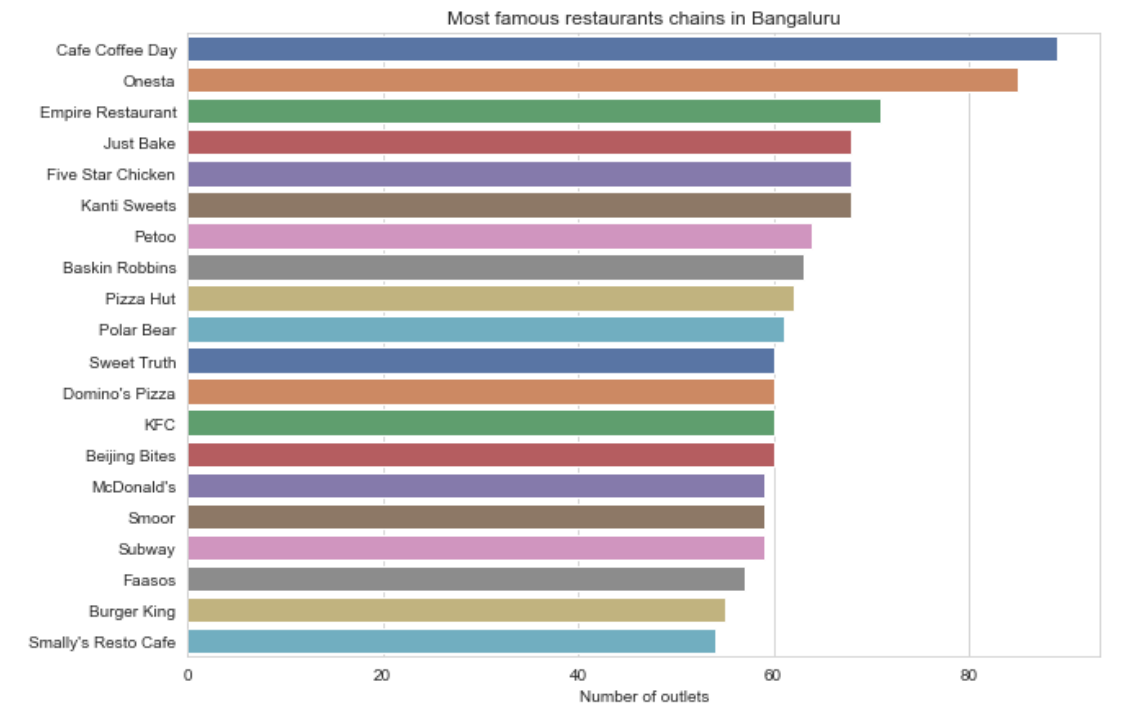
    • Below bar chart shows the most famous restaurant chains in Bangalore with number of outlets.

    image

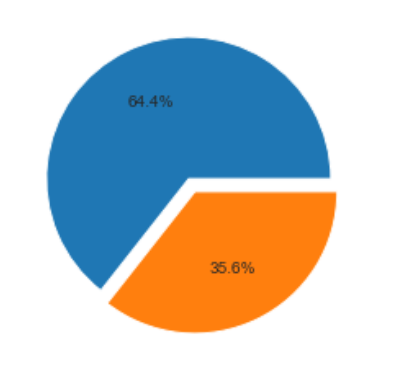
    • The following pie chart shows the percentage of online orders accepted by restaurants.

    image

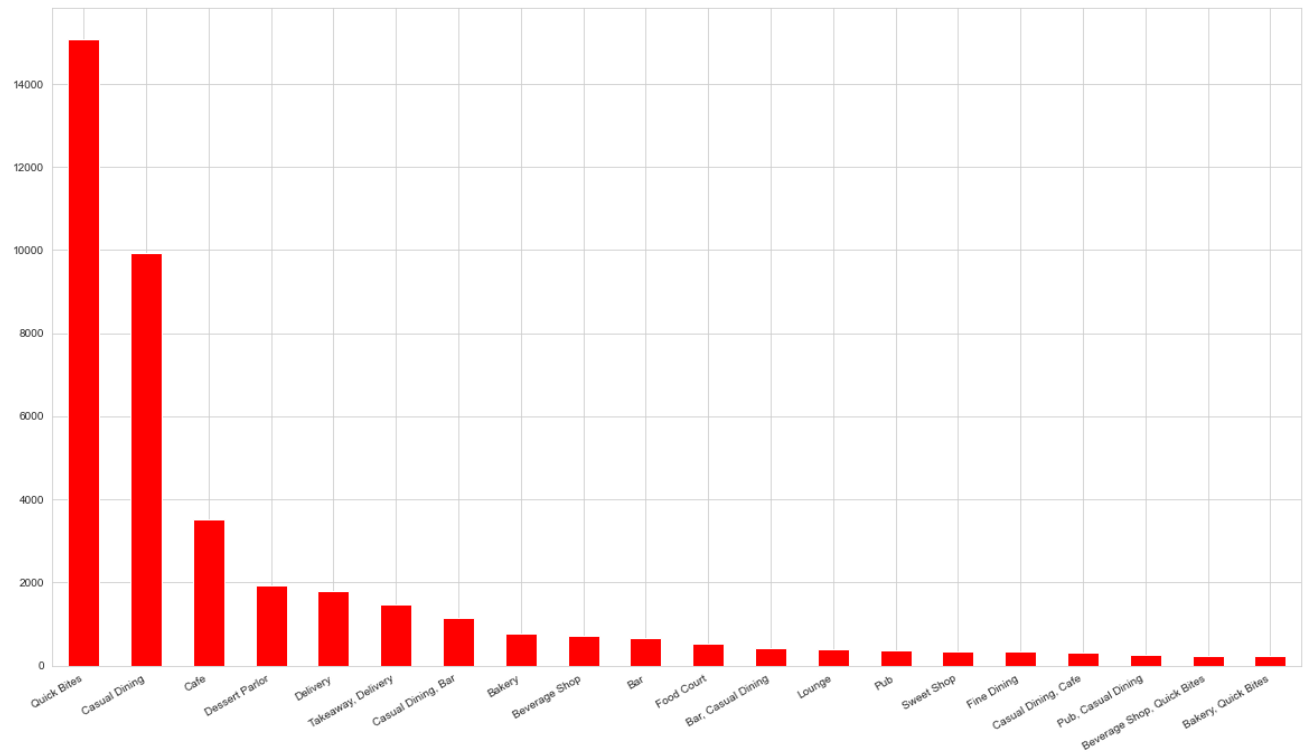
    • The below figure represents the bar chart for different types of restaurants.

    image

    • Bar graph of different varieties of cuisines in Bangalore.

    image

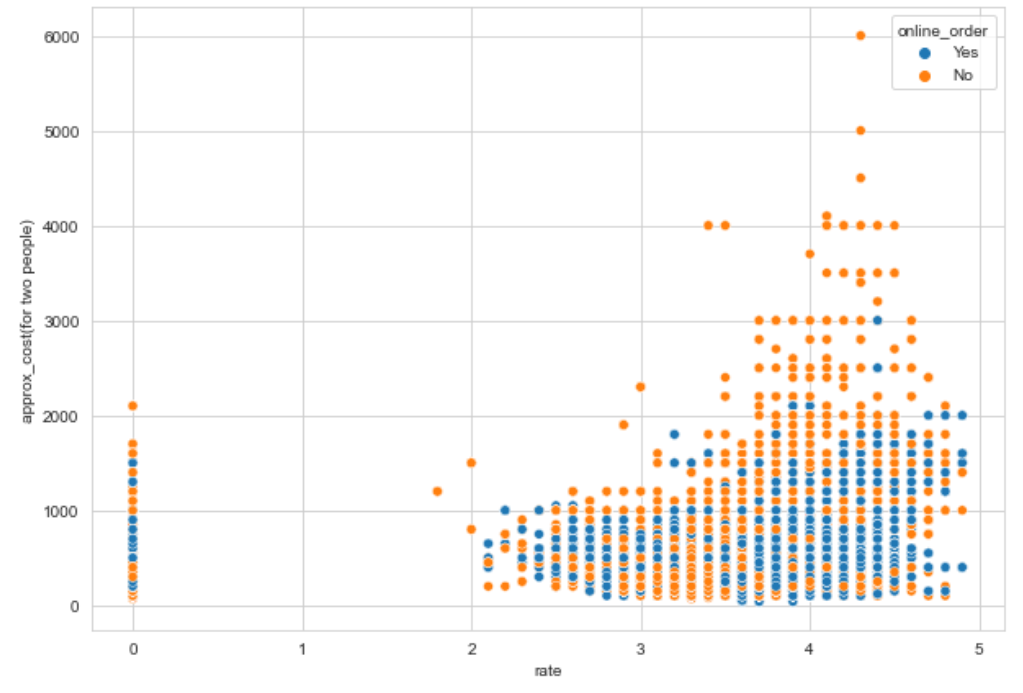
    • Below scatter plot with X axis denotes the ratings of the restaurants and Y axis denotes the approximate cost for 2 people.

    image

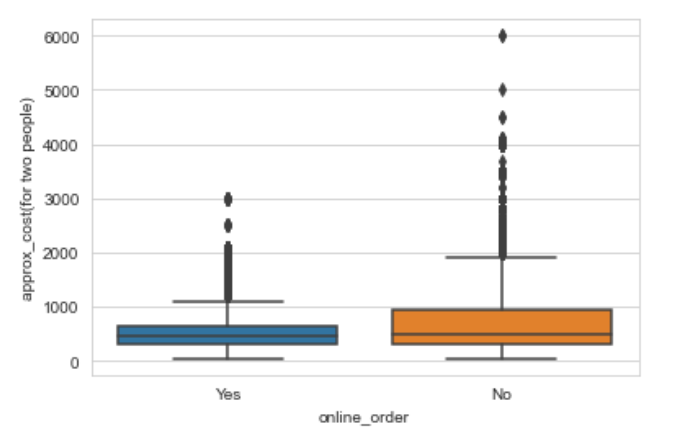
    • Box plot depicting the price difference between restaurants that accept online orders and those that do not

    image

    Geospatial Analysis

    • Geospatial Analysis is useful for locating the geographical area in a particular region.

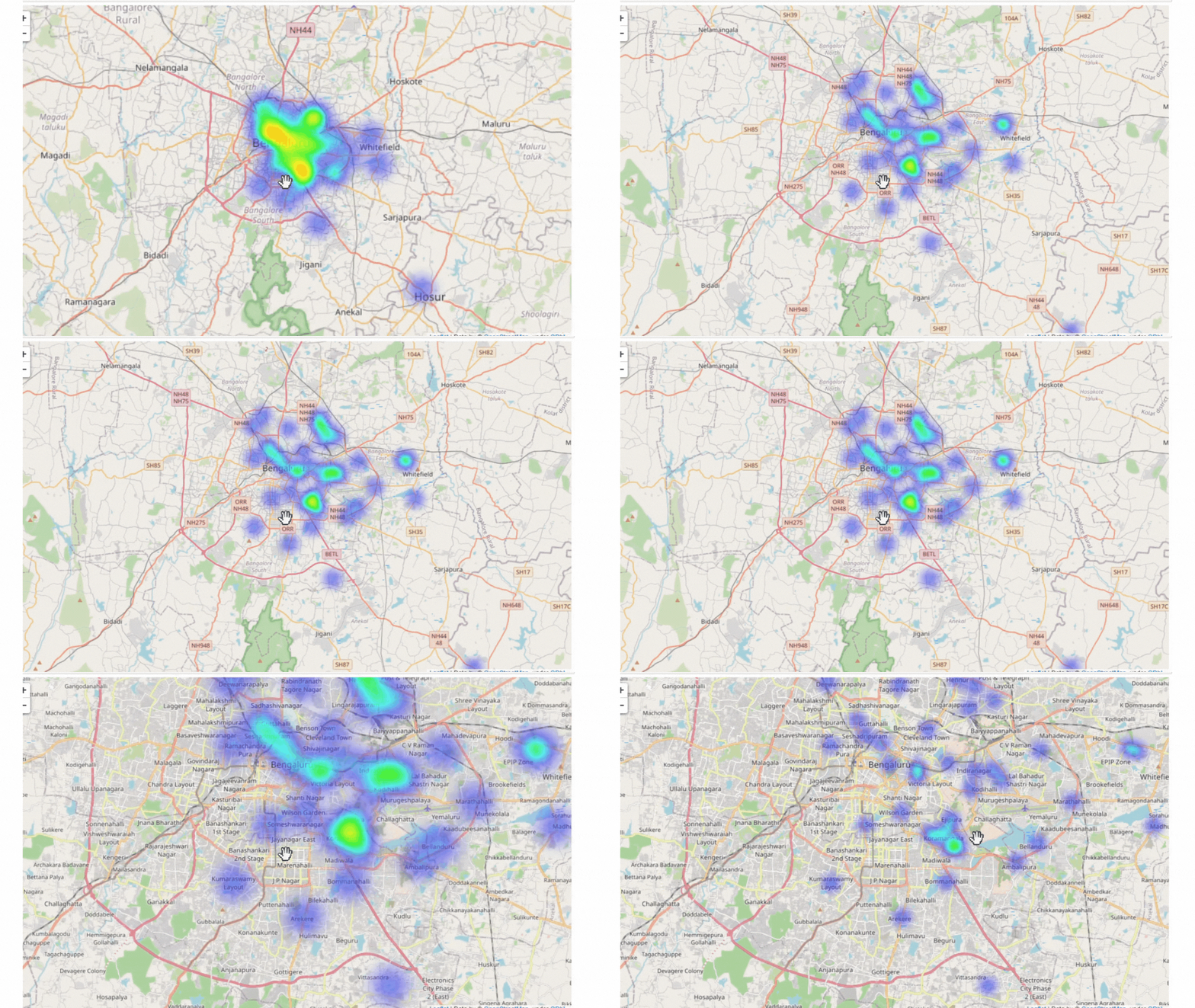
    Heatmap of Restaurants in Bengaluru city

    • For locating the restaurants in geographical map, we need latitudes, longitudes and count of restaurants.
    • Extract the “Latitude” and “Longitude” w.r.t. different Locations using Python’s Geopy library.
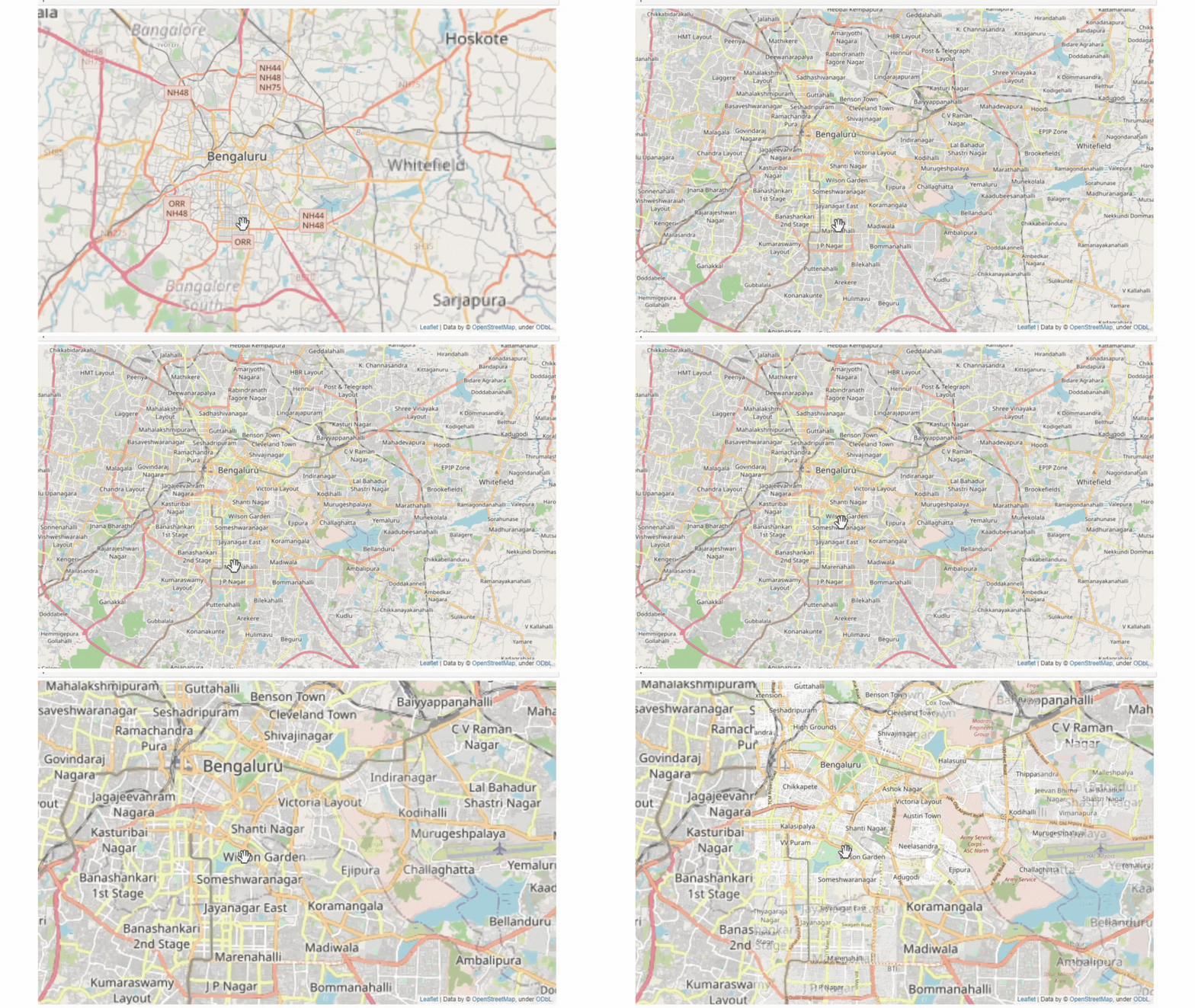
    • Generate a “BaseMap” of Bangalore using Python’s Folium library.

    geo analysis

    • Plot a HeatMap based on variety of use cases with the help of Python’s Folium “HeatMap” Plugins.
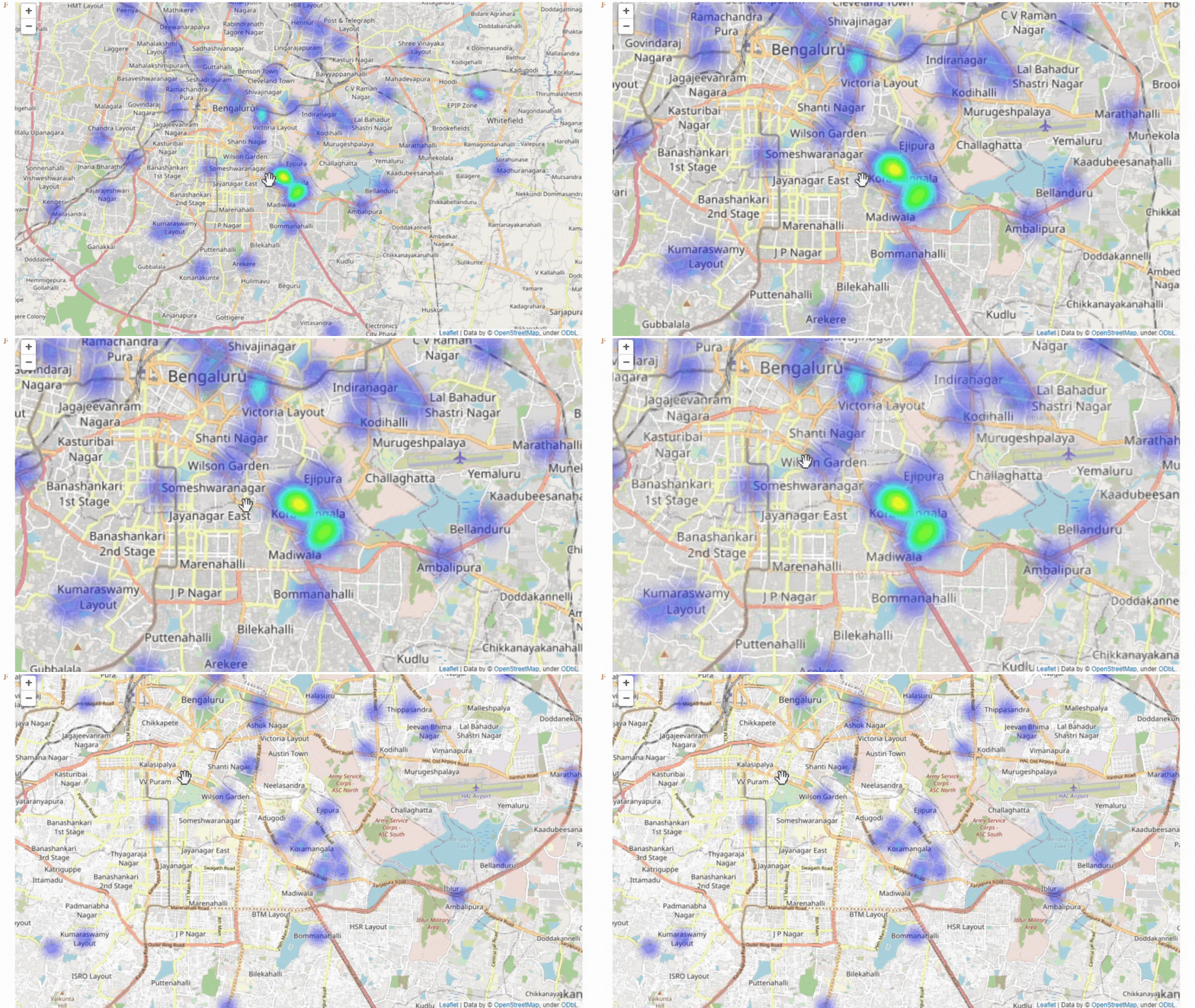
    • The heatmap below depicts the clutter of restaurants in Bengaluru.

    heatmap of blore

    Heatmap of North Indian restaurants

    hm of ni

    Sentiment Analysis

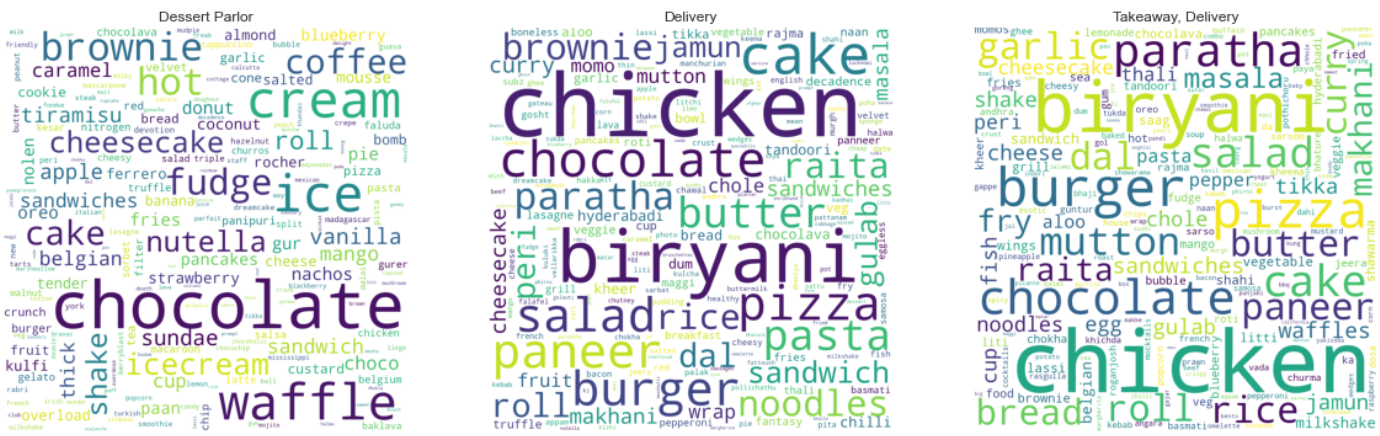
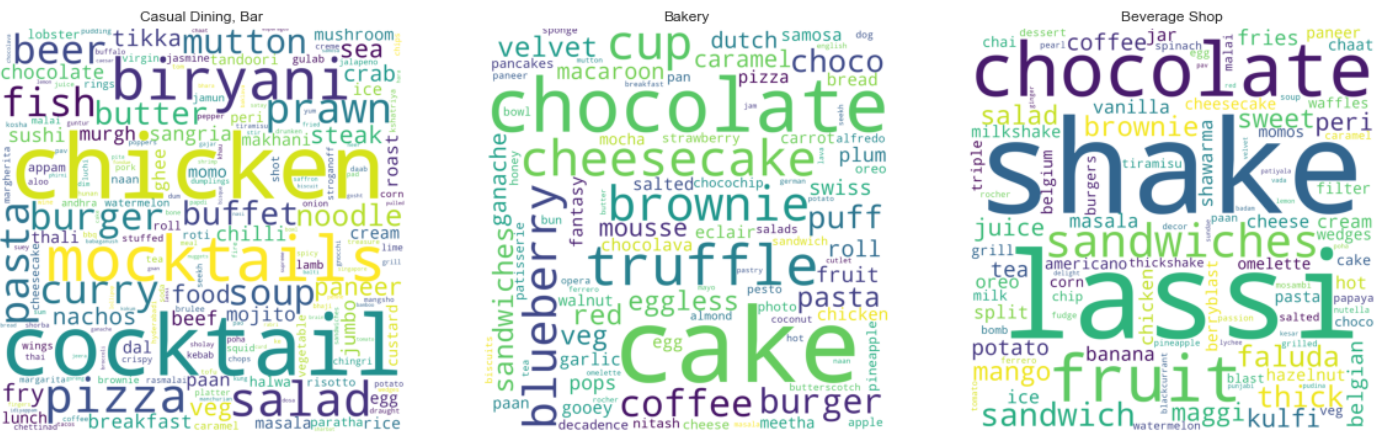
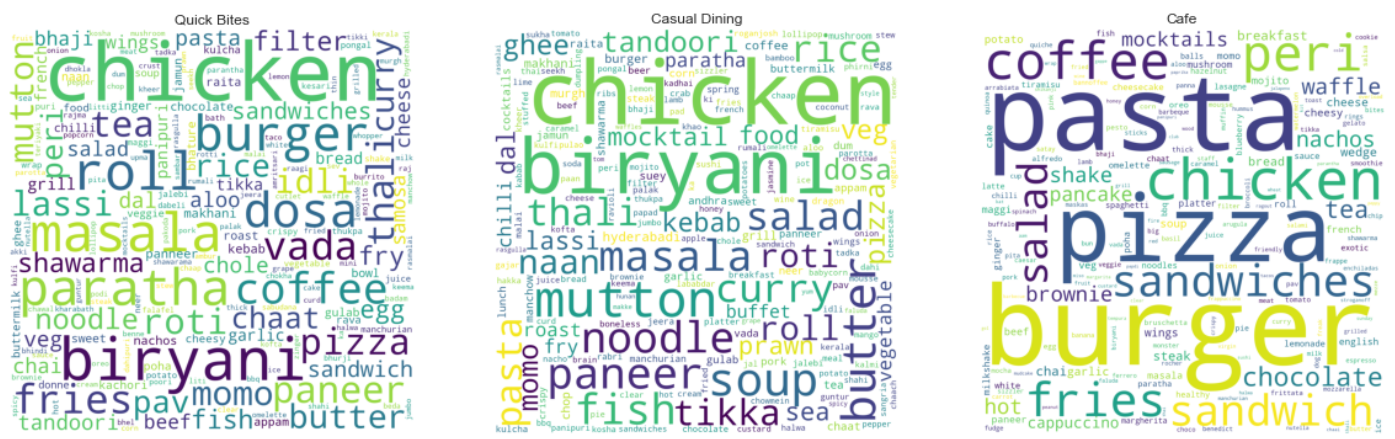
    • Here are the Wordclouds developed using the built-in function in python called “WordCloud” for 9 different types of restaurants where customers left feedback.
    • To generate the below pictured wordclouds using Python, feedbacks are preprocessed, null values are dropped and all characters and spaces are removed except alphabets.

    image

    image

    image

    Tools Used

    Jupyter Notebook Python Pandas NumPy Matplotlib Plotly

    • Jupyter Notebook is used as IDE.
    • Among the Python libraries, Pandas and NumPy are used for handling data, preprocessing, and mathematical operations, respectively.
    • Plotly, Seaborn, and Matplotlib are used for visualizing plots.

    For more details, please go through the Jupyter Notebook attached above.

    Conclusion

    • Cafe Coffee Day dominates the restaurant chain landscape followed by Onesta and then Empire.
    • Online orders are accepted by 64.4% of restaurants, whereas 35.6% of restaurants do not accept them.
    • The city of Bangalore is known as a high-tech hub of India, and people who live a busy and modern life are inclined to choose Quick Bites.
    • The most common cuisines are North Indian, Chinese, and South Indian. Bangalore is therefore influenced more by the cultures of the north than those of the south.
    • Having reviewed the above scatterplot, we can conclude that most of the highest-rated restaurants accept online orders and are budget-friendly as well.
    • In the box plot, it can be seen that there is a discrepancy between the median number of votes for both categories. The Zomato application gives customers the option to rate restaurants after they’ve ordered through it. This will lead to more votes for the restaurants accepting online orders.
    • The majority of the restaurants are priced under 1000, which means they are affordable and few are luxurious.
    • The most no. of eateries are found in BTM, HSR, and Koranmangala 5th block. BTM dominates the section by having more than 4000 restaurants.
    • It is evident that eateries are primarily located in the central Bangalore region. As we get farther from the center of the city, the number of restaurants decreases. Therefore, prospective restaurateurs can consult this to identify suitable places for their business.

    Check out the notebook above to learn more

    Visit original content creator repository