My work through the 2D games with unity book by Jared Halpern and Apress, but using F# instead of C#.
Why? I just prefer the syntax of F#, and its fully compatible with the rest of the .NET runtime. Any functional advantages of F# over C# in the Unity space are a bonus, though most unity code is imperative/mutable/class-based which you just have to accept. F# can do all that pretty easily (public fields on classes are a bit ugly, but I can live with it).
The process is to have a netstandard library you build outside of your unity project, which has a nice post build action to copy the dll inside the project.
All your netstandard F# library needs is a reference to whatever Unity dll you’re using, e.g. UnityEngine to get access to MonoBehaviour (these can be found under the managed folder in your unity install).
Depending on your tolerance, it might be easier to add every dll under managed/unityengine. Particularly when using packages like cinemachine, in order to avoid the same type and namespace coming from difference assemblies.
Finally, the FSharp.Core.dll needs to be adjacent to where you copy the dll. An easy way to get this is to publish your project once and grab the Core dll from the output, copying it over manually to unity.
After that, in Unity you will see your dll wherever you copied it, with a little arrow that allows you to access the scripts inside. Works like a charm.
Further tips for F# with Unity
If you want the ‘I update scripts and they get auto-rebuilt by Unity’ experience you could always dotnet watch build on the separate project, which would have the same effect. I did this during development and its very seamless.
VS Code was a good editor to use, or any editor opened at the root of the project, as it allowed me to maintain the git repo with script changes and main unity project changes. I still used full Visual Studio for adding the dll references however.
C# scripts by default are compiled into a single ‘Assembly-CSharp.dll’ that is located under the project Library folder. Referencing that dll should allow the F# scripts to call any C# scripts you might have added (though I didn’t have any so can’t confirm this).
I need to figure out a nice way to reference the core Unity dlls rather than referencing the install directory (which is version and os and…me…specific). Its only needed for the build, but its still annoying. Maybe a lib folder? Also the unity package manager wouldn’t allow me to download cinemachine (some known bug) so I cloned it from github and added from disk, which unfortunately is reflected in the package manifest. Need to fix that too.
This last note means that if you clone this project, you will probably need to update the reference paths before it will compile. But even though they are a lot most are just a different unity path and the path to cinemachine.
A development environment for Ballet collaborations on top of Jupyter Lab
Using Assemblé, you can develop patches for Ballet projects within Jupyter
Lab and then easily submit them as GitHub Pull Requests (PRs) in one click
without leaving your notebook.
Assemblé (pronounced “assam blay”) is a ballet move that involves lifting
off the floor on one leg and landing on two.
Assemblé is composed of (1) a Python package named ballet_assemble for the
server extension (2) a NPM package also named ballet-assemble for the
frontend extension and (3) tight integration with Binder for each Ballet
project.
Requirements
JupyterLab >= 2.0
Python>=3.6 (64-bit Version)
Install
Installation can be done completely using pip, which installs both the
server and the frontend extensions. The frontend extension only can be
installed using jupyter labextension install but will not function properly
without the corresponding server extension.
pip install ballet_assemble
jupyter lab build
Note: You will need NodeJS to install the extension; the installation process
will complain if it is not found.
Authenticate with GitHub
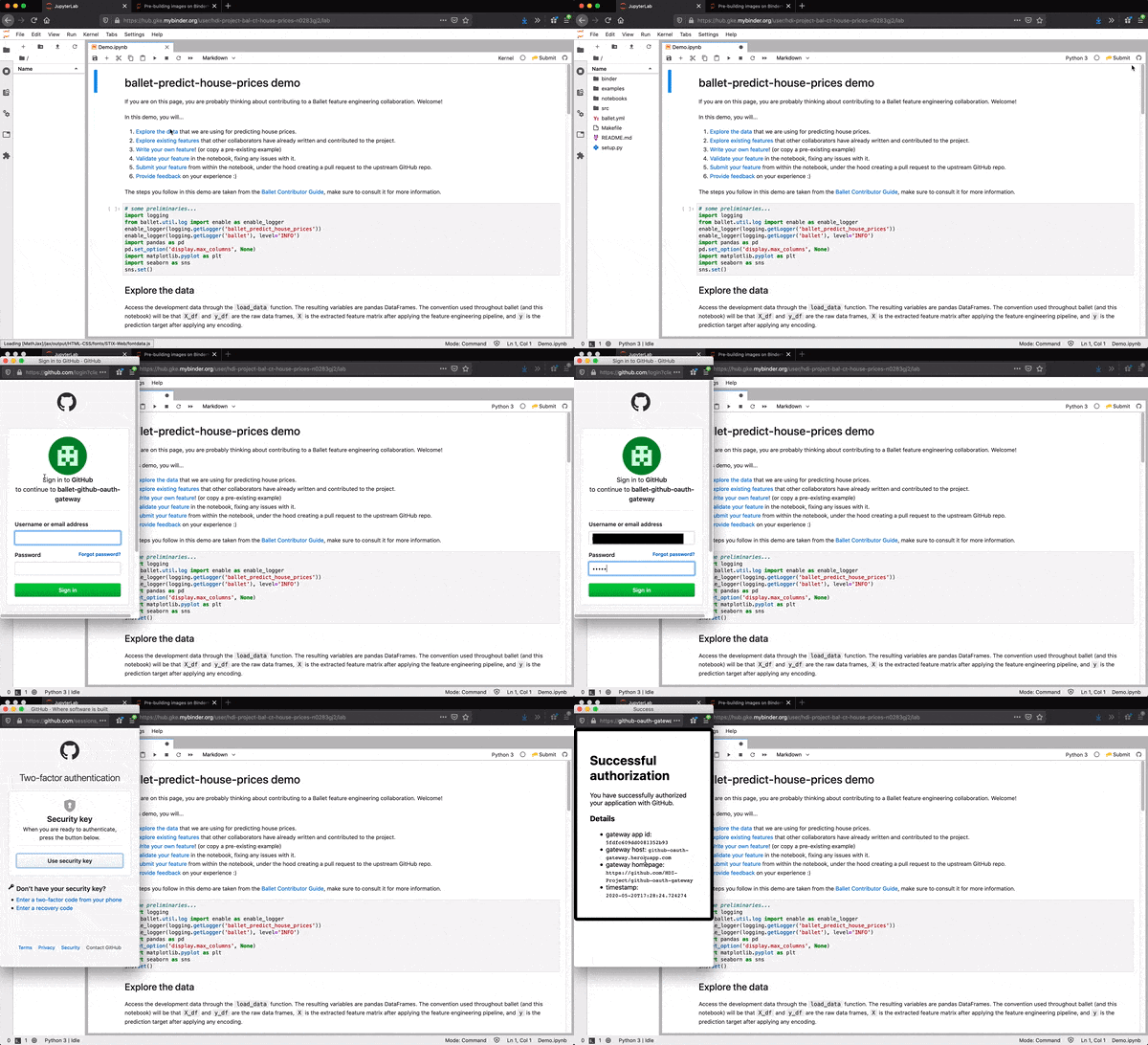
The extension provides an in-Lab experience for authenticating
with GitHub. When you open a notebook, you should see the GitHub icon to the
right on the Notebook toolbar. The icon should be grey at first, indicating
you are not authenticated. Click the icon to open a login window, in which
you can enter your GitHub username and password. These will be exchanged by
the extension for an OAuth token and will be used to propose changes to the
upstream Ballet project on your behalf (if you attempt to submit features).
Alternately, you can provide a personal access token directly using the
configuration approaches below.
Configure
The extension ties into the same configuration system as Jupyter [Lab] itself.
You can configure the extension with command line arguments or via the
config file, just like you configure Jupyter Notebook or Jupyter Lab.
All configuration options
The following configuration options are available:
$ python -c 'from ballet_assemble.app import print_help;print_help()'

AssembleApp options
-----------------
--AssembleApp.access_token_timeout=<Int>
    Default: 60
    timeout to receive access token from server via polling
--AssembleApp.ballet_yml_path=<Unicode>
    Default: ''
    path to ballet.yml file of Ballet project (if Lab is not run from project
    directory)
--AssembleApp.debug=<Bool>
    Default: False
    enable debug mode (no changes made on GitHub), will read from
    $ASSEMBLE_DEBUG if present
--AssembleApp.github_token=<Unicode>
    Default: ''
    github access token, will read from $GITHUB_TOKEN if present
--AssembleApp.oauth_gateway_url=<Unicode>
    Default: 'https://github-oauth-gateway.herokuapp.com/'
    url to github-oauth-gateway server
Command line arguments
Invoke Jupyter Lab with command line arguments providing config to the ballet
extension, for example:
jupyter lab --AssembleApp.debug=True
Config file
Determine the path to your jupyter config file (you may have to create it
if it does not exist):
Append desired config to the end of the file, for example:
c.AssembleApp.debug=True
Troubleshoot
If you are see the frontend extension but it is not working, check
that the server extension is enabled:
jupyter serverextension list
If the server extension is installed and enabled but your not seeing
the frontend, check the frontend is installed:
jupyter labextension list
If it is installed, try:
jupyter lab clean
jupyter lab build
Contributing
Development Install
Running make install-develop will install necessary dependencies and set up the development environment. Alternatively, these steps can be be taken manually with the instructions below
The jlpm command is JupyterLab’s pinned version of
yarn that is installed with JupyterLab. You may use
yarn or npm in lieu of jlpm below.
# Clone the repo to your local environment# Move to ballet-assemble directory# Install server extension with dev dependencies
pip install -e .[dev]
# Register server extension
jupyter serverextension enable --py ballet_assemble
# Install dependencies
jlpm
# Build Typescript source
jlpm build
# Link your development version of the extension with JupyterLab
jupyter labextension link .# Rebuild Typescript source after making changes
jlpm build
# Rebuild JupyterLab after making any changes
jupyter lab build
You can watch the source directory and run JupyterLab in watch mode to watch for changes in the extension’s source and automatically rebuild the extension and application.
# Watch the source directory in another terminal tab
jlpm watch
# Run jupyterlab in watch mode in one terminal tab
jupyter lab --watch
###Feature: Code Slicing
This feature allows to backtrace all code dependencies of a selected cell an extract them from a notebook.
The user receives an executable subset of code lines (the “slice”) which only contains code that is needed for the computation of the selected cell. Note that code will be collected even if it does not define a feature definition.
The slice can then be submitted to an upstream repository.
The code-slicing feature can be activated upon selecting a certain cell and clicking the “SLICE” button in the toolbar.
Limitations:
If the cells were executed out of order (i.e. cell 1 is a dependency of cell 2, but cell 2 dragged above cell 1) the code cannot be collected.
Unlike the gather tool, code cells that have been deleted are no candidates for slicing. For example, if a user creates these two cells but then deletes cell 1, its code content will not be considered for the slice.
This project provides a collection of utility libraries to help reduce the need to write similar code for each project on an ad-hoc basis. The need is based on what I have needed in most projects but are ended up written, as needed, and usually differently each time and without unit tests. The goal is to provide a single place to store each of these libraries and to provide unit tests.
If there are other commonly used code or data-structures that should be added, please add a feature request!
utf-8 – Single header UTF-8 string functions for C and C++
Unit tests
Unit tests are provided using the minunit library. Each function is, hopefully, fully covered. Any help in getting as close to 100% coverage would be much appreciated!
To run the unit-test suite, simply compile the test files using the provided Makefile with the command make test. Then you can execute the tests using the executables ./dist/bitarray, ./dist/strlib, ./dist/fileutils, ./dist/graph, ./dist/llist, ./dist/dllist, ./dist/stack, ./dist/queue, ./dist/permutations, ./dist/minunit, or ./dist/timing.
Issues
If an unexpected outcome occurs, please submit an issue on github. Please also provide a minimal code example that encapsulates the error.
s_remove_unwanted_chars shows duplicate entries after removal.
chartest[] ="This is a test";
// expect "Ths s a es"// get "Ths s a esest"// Notice the extra `est`; likely due to not erasing the trailing charss_remove_unwanted_chars(test, "ti");
Examples
Example programs are provided in the ./examples folder. You can compile these examples using make examples. They can be run from the ./dist folder and are named prepended with ex_.
Not all functionality is demonstrated for all libraries, but hopefully enough is present to help make using these libraries easier. All functionality for each library is documented in the .h files.
stringlib
A collection of c-string functions that I find myself writing for many of my projects. This library provides a single place to store this functionality while ensuring that everything is as minimalistic as possible. In most cases, the string is modified in place. No additional structs are needed as it uses vanilla c-strings everywhere.
Those functions that have a const char* do not modify the string!
Documentation of each function is found in the stringlib.h file.
Compiler Flags
NONE – There are no needed compiler flags for the stringlib library
Usage
To use, copy the stringlib.h and stringlib.c files into your project folder and add them to your project.
#include"stringlib.h"charstr[] =" This is a \t horrible \n\r string \f to\n clean up... please help!\n\r";
// we can trim and stanardize whitespaces to a single whitespaces_single_space(str); // "This is a horrible string to clean up... please help!"// find the first `u`intpos=s_find(str, 'u'); // 35// find the first `ri`pos=s_find_str(str, "ri"); // 13// find the last `ri`pos=s_find_str_reverse(str, "ri"); // 21// remove unwanted characterss_remove_unwanted_chars(str, "tph"); // "Tis is a orrible sring o clean u... lease el!"
fileutils
The file utils library provides utility functions to deal with basic file system operations. From determining if a file exists, to making directories, to reading in a file and parsing out the lines.
All functions are documented within the fileutils.h file.
Unfortunately, I have not been able to test this library on Windows machines. If errors arise on Windows, please submit an issue or, even better, a pull request! If something is shown to work on Windows, that information would also be very helpful!
Compiler Flags
NONE – There are no needed compiler flags for the fileutils library
Usage
To use, copy the fileutils.h and fileutils.c files into your project folder and add them to your project.
#include"fileutils.h"intres;
/* General path / file functionality */char*current_working_directory=fs_cwd();
fs_mkdir("path_of_new_dir", false); /* do not recursively make the dirs *//* if the unknown path is a file, remove it! */if (fs_identify_path("unknown_path") ==FS_FILE) {
fs_remove_file("unkown_path");
}
if (fs_rmdir_alt("path_to_non_empty_directory", true) ==FS_NO_EXISTS) {
printf("Successfully removed the directory and all sub directories and files!");
}
/* parse and read a file */file_tf=f_init("path_to_file");
printf("Base dir: %s\n", f_basedir(f));
printf("Filename: %s\n", f_filename(f));
printf("Extension: %s\n", f_extension(f));
printf("File Size: %llu\n", f_filesize(f));
/* read the file contents into a buffer */f_read_file(f);
/* parse the file into lines */f_parse_lines(f);
f_free(f);
bitarray
The bit array library is provided to allow for a drop in bit array. It uses the smallest binary size possible for the array (char) to reduce the few extra bits needed compared to using an int (8 bits per element vs 32). It also tracks how many bits were desired and how many elements were used to hold the bit array.
Compiler Flags
NONE – There are no needed compiler flags for the bitarray library
Usage
To use, copy the bitarray.h and bitarray.c files into your project folder and add them to your project.
#include"bitarray.h"bitarray_tba=ba_init(20000000); // we want to track 20,000,000 items!for (inti=0; i<20000000; i++) {
if (i % 5==0) // whatever makes us want to set track this elementba_set_bit(ba, i);
}
// we can check bits easily!if (ba_check_bit(ba, 10000000) ==BIT_SET)
printf("Bit 10,000,000 is set!\n");
elseprintf("Bit 10,000,000 is not set!\n");
// we can also clear a single bit or reset the whole arrayba_clear_bit(ba, 10000000); // a check would now be BIT_NOT_SETba_reset_bitarray(ba); // all the bits are set to 0// free all the memory!ba_free(ba);
linkedlist
This library adds a generic linked list implementation. Any type of data can be added to the list as the data type of the data is void*. Elements can be added or removed to the end or any location within the list. If you have fewer access and removal needs it may be better to use a stack which provides the same structure.
All functions are documented within the llist.h file.
Compiler Flags
NONE – There are no needed compiler flags for the linked list library
Usage
To use, simply copy the llist.h and llist.c files into your project and include it where needed.
#include"llist.h"llist_tl=ll_init();
int*get_random() {
int*t=calloc(1, sizeof(int));
*t=rand() % 100000;
returnt;
}
inti;
for (i=0; i<1000; i++) {
int*t=get_random();
ll_append(l, t);
}
i=0;
ll_nodenode;
ll_traverse(l, node) {
intval=*(int*)node->data;
printf("idx: %d\tval: %d\n", i++, val);
}
// or iterate the old fashion waynode=ll_first_node(l);
while (node!=NULL) {
intval=*(int*)node->data;
printf("idx: %d\tval: %d\n", i++, val);
node=node->next;
}
ll_free_alt(l, true); // even free the data field
doublylinkedlist
This library adds a generic doubly linked list implementation. Any type of data can be added to the list as the data type of the data is void*. Elements can be added or removed to the end or any location within the list. This is useful when you need to control where nodes are inserted and the order that they are removed. If you have fewer access and removal needs it may be better to use a queue which provides the same structure.
All functions are documented within the dllist.h file.
Compiler Flags
NONE – There are no needed compiler flags for the doubly linked list library
Usage
To use, simply copy the dllist.h and dllist.c files into your project and include it where needed.
#include"dllist.h"dllist_tl=dll_init();
int*get_random() {
int*t=calloc(1, sizeof(int));
*t=rand() % 100000;
returnt;
}
inti;
for (i=0; i<1000; i++) {
int*t=get_random();
dll_append(l, t);
}
i=0;
dll_nodenode;
dll_traverse(l, node) {
intval=*(int*)node->data;
printf("idx: %d\tval: %d\n", i++, val);
}
// or iterate the old fashion way in reverse (or dll_reverse_traverse)node=dll_last_node(l);
while (node!=NULL) {
intval=*(int*)node->data;
printf("idx: %d\tval: %d\n", i++, val);
node=node->prev;
}
dll_free_alt(l, true); // even free the data field
stack
Built using the linked list code, this provides a special implementation of a linked list that always inserts and removes the first element in the linked list. This is useful in instances that there is no need for arbitrary insertion and removal locations from the linked list. As such, this version can be slightly faster than a linked list since insertion is constant.
All functions are documented within the stack.h file.
Compiler Flags
NONE – There are no needed compiler flags for the stack library
Usage
To use, simply copy the stack.h and stack.c files into your project and include it where needed.
#include"stack.h"stack_list_tstk=stk_init();
int*get_random() {
int*t=calloc(1, sizeof(int));
*t=rand() % 100000;
returnt;
}
inti;
for (i=0; i<1000; i++) {
int*t=get_random();
stk_push(stk, t);
}
int*val= (int*) stk_pop(stk); // this will be the last item pushed on the stack!
queue
Built using the doubly linked list code, this provides a special implementation of a doubly linked list that always inserts at the end of the list and always removes the first element. This is useful in instances that there is no need for arbitrary insertion and removal locations from the linked list but you want to either be able to access all nodes from both directions or you want to maintain a FIFO (first in first out) approach. As such, this version can be slightly faster than a doubly linked list since insertion and deletion are constant.
All functions are documented within the queue.h file.
Compiler Flags
NONE – There are no needed compiler flags for the queue library
Usage
To use, simply copy the queue.h and queue.c files into your project and include it where needed.
#include"queue.h"queue_list_tq=q_init();
int*get_random() {
int*t=calloc(1, sizeof(int));
*int=rand() % 100000;
returnt;
}
inti;
for (i=0; i<1000; i++) {
int*t=get_random();
q_push(q, t);
}
int*val= (int*) q_pop(q); // this will be the first item pushed on the queue!
graph
This library adds a directed graph implementation that allows for any data type to be used for vertex or edge metadata. It tracks all the vertices and edges inserted into the graph and helps ensure that there are no dangling edges.
There are several ways to traverse the graph or to easily loop over vertices and edges. Macros are provided to allow for iterating over vertices or over the edges that emanate from the vertex: g_iterate_vertices and g_iterate_edges. There are also to helper functions to do either a breadth first or depth first traverse starting from a particular vertex: g_breadth_first_traverse and g_depth_first_traverse.
All functions are documented within the graph.h file.
Compiler Flags
NONE – There are no needed compiler flags for the graph library
Usage
To use, simply copy the graph.h and graph.c files into your project and include it where needed.
#include"graph.h"graph_tg=g_init();
// add some verticiesg_vertex_add(g, "Washington D.C.");
g_vertex_add(g, "Raleigh NC");
g_vertex_add(g, "Boston, Mass");
g_vertex_add(g, "Cincinati, OH");
// add edgesg_edge_add(g, 0, 1, "250 miles"); // washington to ralieghg_edge_add(g, 0, 2, "150 miles"); // washington to bostong_edge_add(g, 0, 3, "300 miles"); // washington to cincinatig_edge_add(g, 1, 3, "500 miles"); // raliegh to cincinatig_edge_add(g, 2, 3, "400 miles"); // boston to cincinati// iterate over the verticiesvertex_tv;
unsigned inti, j;
g_iterate_vertices(g, v, i) {
printf("idx: %d\tcity: %s\n", i, g_vertex_metadata(v));
// iterate over the edges!edge_te;
g_iterate_edges(v, e, j) {
vertex_tdest=g_vertex_get(g_edge_dest(e));
printf("\tto: %s\tdistance: %s\n", g_vertex_metadata(dest), g_edge_metadata(e));
}
}
g_free_alt(g, false);
permutations
There are times when one needs to run over all (most?) of the permutations of a set of characters, or numbers. This library allows the user to pass initialize a permutation list and give it a length and an alphabet and get the permutations as needed such as to check for all possible k-mers in a genome, among other uses!
Compiler Flags
NONE – There are no needed compiler flags for the permutations library
Usage
To use, simply copy the permutations.h and permutations.c files into your project and include it where needed.
#include"permutations.h"permutations_tp=perm_init(5, "ATCG");
// number permutations is alphabet length raised to the input lengthfor (unsigned inti=0; i<1024; ++i) {
perm_inc(p);
// do something with the new permutationprintf("%s\n", perm_to_string(p));
}
perm_free(p);
timing-c
This header utility is to be able to quickly provide timing functionality to standard C code. It is designed to be beneficial to me as I am tired of re-writting the same type of functionality. To use, simply copy the header into your project folder.
Compiler Flags
NONE – There are no needed compiler flags for the timing.h library
Usage
To use, simply copy the timing.h file into your project and include it where needed.
#include<stdio.h>#include<stdlib.h>#include"timing.h"Timingt;
timing_start(&t);
// code to time heretiming_end(&t);
printf("time elapsed: %f\n", t.timing_double);
// get to elapsed time elements easilyprintf("hours: %d\n", timing_get_hours(t));
printf("minutes: %d\n", timing_get_minutes(t));
printf("seconds: %d\n", timing_get_seconds(t));
printf("milliseconds: %d\n", timing_get_milliseconds(t));
printf("microseconds: %d\n", timing_get_microseconds(t));
// get to a pretty print versionchar*output=format_time_diff(&t);
printf("pretty output: %s\n", output);
free(output);
minunit
This header utility is a testing framework for C programs. It is a fork of siu/mununit that adds several assertions that are not in the base library. License (MIT) information is contained in the header file.
Compiler Flags
NONE – There are no needed compiler flags for the minunit.h testing framework.
Usage
For full examples, please view the tests in the ./test folder. A quick run down of setting up the tests is provided below along with a quick set of function documentation.
#include<stdio.h>#include<stdlib.h>#include<minunit.h>intarr[25];
voidtest_setup(void) {
for (inti=0; i<25; ++i)
arr[i] =i;
}
voidtest_teardown(void) {
// no teardown required
}
MU_TEST(test_simple) {
mu_assert_int_eq(0, arr[0]);
}
// Set up the test suite by configuring and stating which tests should be runMU_TEST_SUITE(test_suite) {
MU_SUITE_CONFIGURE(&test_setup, &test_teardown);
MU_RUN_TEST(test_simple);
}
intmain() {
MU_RUN_SUITE(test_suite);
MU_REPORT();
printf("Number failed tests: %d\n", minunit_fail);
returnminunit_fail;
}
Documentation
mu_check(test): Checks to verify that the passed boolean expression test is true; fails otherwise.
mu_fail(message): Automatically fails the assertion and returns the provided message; useful for non-implemented features, etc.
mu_assert(test, message): Assert that the boolean expression test is true, otherwise fail and print the passed message.
mu_assert_int_eq(expected, result): Assert that the expected int is the same as the passed result.
mu_assert_int_not_eq(expected, result): Assert that the result does not equal expected; not this is useful for checking comparison functions, etc.
mu_assert_int_greater_than(val, result): Assert that result is greater than val.
mu_assert_int_less_than(val, result): Assert that result is less than val.
mu_assert_int_between(expected_lower, expected_upper, result): Assert that the result is between (inclusive) expected_lower and expected_upper; if upper and lower are reversed, then it is not between!
mu_assert_int_in(expected, array_length, result): Assert that the result is a member of the expected array; array_length is needed to know the number of elements in the array.
mu_assert_double_eq(expected, result): Assert that the double in result is the same as the expected double.
mu_assert_double_greater_than(val, result): Assert that result is greater than val.
mu_assert_double_less_than(val, result): Assert that result is less than val.
mu_assert_double_between(expected_lower, expected_upper, result): Assert that result is between (inclusive) expected_lower and expected_upper; if upper and lower are reversed, then it is not between!
mu_assert_string_eq(expected, result): Assert that the result string (char* or char[]) is the same as the expected string.
mu_assert_null(result): Assert that the passed result pointer is NULL.
mu_assert_not_null(result): Assert that the passed result pointer is not NULL.
mu_assert_pointers_eq(pointer1, pointer2): Assert that pointer1 and pointer2 point to the same memory location.
mu_assert_pointers_not_eq(pointer1, pointer2): Assert that pointer1 and pointer2 do not point to the same memory location.
Front-end for The Trans Dimension, an online community hub which will connect trans communities across the UK by collating news, events and services by and for trans people in one easy-to-reach place. A collaboration between Gendered Intelligence and Geeks for Social Change.
make sure you are using the correct node version with nvm use
install with npm install
Copy .env.example over into .env and edit as appropriate! This must be done before any of the following will work as it generates src/Constants.elm which is used in a number of places in the code.
npm run build generate a production build in dist/
Formatting
There is a pre-commit hook that runs elm-format --yes. This will format your files when you commit. This might interfere with the state of files in your IDE. So, we recommend integrating elm-format@0.8.3 on save into your code editor.
You can also manually run npm run format to format .elm files in src.
Testing
We’re using elm-test-rs to run elm tests. It is required to run either npm start (quickest) or npm build at least once in the project before tests will work.
We welcome new contributors but strongly recommend you have a chat with us in Geeks for Social Change’s Discord server and say hi before you do. We will be happy to onboard you properly before you get stuck in.
Donations
If you’d like to support development, please consider sending us a one-off or regular donation on Ko-fi.
Modelling was performed in R Statistical Software (version 3.6.1) using the svyglm function [22]. The complete code is freely available on GitHub (https://github.com/Gluschkoff/tst-depr). Statistical significance for all tests was set at p < .05, and all tests were two-tailed. Given the exploratory nature of the study, nonsignificant associations with p values < .10 are also noted.
Linear regression models were fitted to examine the sex-specific associations of total testosterone with depression sum score and logistic regression for associations with specific symptoms of depression. We first examined the associations of low total testosterone. For this analysis, total testosterone levels were dichotomized into low and normal categories (cut-off <300 ng/dL for men and <15 ng/dL for women) [18,19,23]. To accommodate for more complex, potential non-linear associations, we next used restricted (also known as natural) cubic splines to model the distribution of total testosterone (see Ref. [24].) A spline is constructed of piecewise polynomials which pass through a set of data values (i.e., knots). The spline included two boundary knots (the lowest and highest values of testosterone) and two internal knots that were placed at the 33rd and 66th percentiles of total testosterone (316.83 and 456.73 for men, 14.75 and 24.30 for women). Statistical significance of the overall effect of total testosterone was tested with a Wald test.
After fitting unadjusted models, we adjusted for the effects of age, BMI, alcohol use, smoking, physical activity (men and women), and pregnancy status (women). As a sensitivity analysis, we repeated all the analysis in the subsets of men and women who screened positive for at least mild depression (PHQ9 sum score > 4). We also assessed the sensitivity of our results to an alternative coding strategy where we used log-transformed testosterone values instead of raw concentrations.
Following NHANES analytic and reporting guidelines, all analyses were conducted using survey procedures to account for the complex survey design (including oversampling), survey nonresponse, and post-stratification.
This will create a teamwork.php in your config directory.
The default configuration should work just fine for you, but you can take a look at it, if you want to customize the table / model names Teamwork will use.
Run the migration command, to generate all tables needed for Teamwork.
If your users are stored in a different table other than users be sure to modify the published migration.
php artisan migrate
After the migration, 3 new tables will be created:
teams — stores team records
team_user — stores many-to-many relations between users and teams
team_invites — stores pending invites for email addresses to teams
You will also notice that a new column current_team_id has been added to your users table.
This column will define the Team, the user is currently assigned to.
Add the UserHasTeams trait to your existing User model:
<?phpnamespaceApp;
useMpociot\Teamwork\Traits\UserHasTeams;
class User extends Model {
use UserHasTeams; // Add this trait to your model
}
This will enable the relation with Team and add the following methods teams(), ownedTeams()currentTeam(), invites(), isTeamOwner(), isOwnerOfTeam($team), attachTeam($team, $pivotData = []), detachTeam($team), attachTeams($teams), detachTeams($teams), switchTeam($team), isOwnerAuth(), isOwnerAuthCheck() within your User model.
Now thanks to the UserHasTeams trait, assigning the Teams to the user is uber easy:
$user = User::where('username', '=', 'sebastian')->first();
// team attach alias$user->attachTeam($team, $pivotData); // First parameter can be a Team object, array, or id// or eloquent's original technique$user->teams()->attach($team->id); // id only
By using the attachTeam method, if the User has no Teams assigned, the current_team_id column will automatically be set.
The currently assigned Team of a user can be accessed through the currentTeam relation like this:
echo"I'm currently in team: " . Auth::user()->currentTeam->name;
echo"The team owner is: " . Auth::user()->currentTeam->owner->username;
echo"I also have these teams: ";
print_r( Auth::user()->teams );
echo"I am the owner of these teams: ";
print_r( Auth::user()->ownedTeams );
echo"My team has " . Auth::user()->currentTeam->users->count() . " users.";
The Team model has access to these methods:
invites() — Returns a many-to-many relation to associated invitations.
users() — Returns a many-to-many relation with all users associated to this team.
owner() — Returns a one-to-one relation with the User model that owns this team.
hasUser(User $user) — Helper function to determine if a user is a teammember
If your Users are members of multiple teams you might want to give them access to a switch team mechanic in some way.
This means that the user has one “active” team, that is currently assigned to the user. All other teams still remain attached to the relation!
Glad we have the UserHasTeams trait.
try {
Auth::user()->switchTeam( $team_id );
// Or remove a team association at all
Auth::user()->switchTeam( null );
} catch( UserNotInTeamException$e )
{
// Given team is not allowed for the user
}
Just like the isOwnerOfTeam method, switchTeam accepts a Team object, array, id or null as a parameter.
The best team is of no avail if you’re the only team member.
To invite other users to your teams, use the Teamwork facade.
Teamwork::inviteToTeam( $email, $team, function( $invite )
{
	// Send email to user / let them know that they got invited
});
You can also send invites by providing an object with an email property like:
$user = Auth::user();

Teamwork::inviteToTeam( $user , $team, function( $invite )
{
	// Send email to user / let them know that they got invited
});
This method will create a TeamInvite model and return it in the callable third parameter.
This model has these attributes:
email — The email that was invited.
accept_token — Unique token used to accept the invite.
deny_token — Unique token used to deny the invite.
In addition to these attributes, the model has these relations:
user() — one-to-one relation using the email as a unique identifier on the User model.
team() — one-to-one relation return the Team, that invite was aiming for.
inviter() — one-to-one relation return the User, that created the invite.
Note:
The inviteToTeam method will not check if the given email already has a pending invite. To check for pending invites use the hasPendingInvite method on the Teamwork facade.
Example usage:
if( !Teamwork::hasPendingInvite( $request->email, $request->team) )
{
	Teamwork::inviteToTeam( $request->email, $request->team, function( $invite )
	{
                // Send email to user
	});
} else {
	// Return error - user already invited
}
If your models are somehow limited to the current team you will find yourself writing this query over and over again: Model::where('team_id', auth()->user()->currentTeam->id)->get();.
To automate this process, you can let your models use the UsedByTeams trait. This trait will automatically append the current team id of the authenticated user to all queries and will also add it to a field called team_id when saving the models.
Note:
This assumes that the model has a field called team_id
Usage
useMpociot\Teamwork\Traits\UsedByTeams;
class Task extends Model
{
use UsedByTeams;
}
When using this trait, all queries will append WHERE team_id=CURRENT_TEAM_ID.
If theres a place in your app, where you really want to retrieve all models, no matter what team they belong to, you can use the allTeams scope.
Example:
// gets all tasks for the currently active team of the authenticated user
Task::all();

// gets all tasks from all teams globally
Task::allTeams()->get();
There is only one requirement to use this template.
Node.JS LTS or greater.
First time Usage
There are two ways to develop extensions- the first is the Developer Rig, which is the preferred option. The second is to use Local Test and test on Twitch on your channel page.
If you are using the Developer Rig and have used this as your basis for your extension, this is easy to start with. The full steps are:
Click on Add Project, then Create Project
Either create a new extension or use an existing one and hit “Next”
Choose “Use boilerplate code” under “Add Code to your Project” and hit “Next”
Let the boilerplate code download, install dependencies, and complete. Once finished, hit “Get Started”
Click on “Run Frontend” and add views in the “Extension Views” tab
Accept any certificate errors, as the certificate is self-signed
You can now make changes in real-time and it’ll update in all views!
Please note that HTTPS only works with the Developer Rig version 1.1.4 and above.
If you are using a version below that, please either upgrade the Developer Rig (by either auto-updating or reinstalling the Developer Rig) or disable HTTPS. To disable HTTPS:
Go into /webpack.config.js.
Update config.devServer.https = true to config.devServer.https = false.
On the Twitch Developer Console, make sure to update the Asset Hosting path for your extension to use http instead.
Refresh your manifest in the Developer Rig and recreate your views.
Local Development
If you’re wanting to develop this locally, use the below instructions.
To use this, simply clone the repository into the folder of your choice.
For example, to clone this into a extensions-boilerplate folder, simply run the following in a command line interface:
Run npm install to install all prerequisite packages needed to run the template.
Run npm run start to run the sample. By default, you should be be able to go to https://localhost:8080/ and have the page show the instructions to get up and running. This README includes that same information. This sample requires it be run on https://twitch.tv/ or the Twitch Developer Rig to utilize the Twitch Extension Helper.
It should also give a certificate error- this is expected, as the sample uses a self-signed certificate to support HTTPS.
If you had to change the port (likely due to a port conflict), update the port in the URL above.
Loading the Sample on Twitch
Now that you have the boilerplate loaded and installed, you’ll need two things first.
The extension installed on your own channel. This can be done in the “Invite Only” section of the Extension Store, where you’ll find your extension listed.
Once you’ve installed your extension, you’ll need to activate the extension and add it to any of the available slots: Panel, Component, or Overlay. Do note that Component or Overlay extensions require you to be live when testing.
Go to your channel on Twitch and you’ll have to click on “Accept” on the extension. It should load.
If it doesn’t load, don’t fret! Simply visit the URL for the view (https://localhost:8080/panel.html for a panel view, for example) and accept the certificate. Go back to your channel page on Twitch and you’ll be good to go!
Moving to Hosted Test (and beyond!)
When you are happy with how your extension looks locally, you can then move into Hosted Test on Twitch.
Twitch will host your frontend assets for you. To upload your frontend files, zip the contents of your dist directory after running npm run build. Note that the contents of the dist directory must be at the root of your zip file. If you have trouble viewing your extension please make sure that your files are not wrapped in a parent folder at the root of the zip file.
For OSX, you can run zip -r ../dist.zip dist/* in the dist folder to generate a properly formatted zip file.
For Windows, you can select all files in the folder and add to compressed archive.
From the developer dashboard for your extension, navigate to the Files tab and upload your zip file. This could take a few minutes if your project is large.
Once your front end files are uploaded, go back to the Status tab and click on “Move To Hosted Test”.
You should now be able to add your extension to your Twitch page and see what it looks like on your page. There is a handy link to do that in the dashboard using the “View on Twitch and Install” button!
Webpack Config
The Webpack config is stored under /webpack.config.js. Adjusting the config will allow you to disable building code for unneeded extension views. To do so, simply turn the build attribute on the path to false.
One fairly important note is that the current configuration does not minimize the Webpack output. This is to help with the extension review policy, as turning this setting to minimize will guarantee that review will need full source to complete the review.
Additionally, feel free to modify the code as needed to add either additional plugins (via modifying the plugins variable at the top) or simply adjusting/tuning the output from Webpack.
Authentication
There is a basic Authentication class included in this boilerplate to handle simple use-cases for tokens/JWTs.
It is important to note that this class does not validate that the token is legitimate, and instead should only be used for presentational purposes.
If you need to use the token for any logic/permissioning, please have your EBS validate the token on request using the makeCall() method as provided in the function. This will automatically pass the JWT to the endpoint provided.
This then enables you to call a number of functions based on the token. The other functions are blind to whether the token is actually signed by Twitch, however, and should be only used for presentational purposes. Any requests to the backend should validate that the token is signed correctly by comparing signatures.
For a small demonstration of the class, see the App component.
File Structure
The file structure in the template is laid out with the following:
dist
/dist holds the final JS files after building. You can simply zip up the contents of the folder to upload to Twitch to move to Hosted Test, as noted above.
public
/public houses the static HTML files used for your code’s entrypoint. If you need to add new entrypoints (for something custom, such as a specific view that’s only for a subset of users), simply add it to the webpack config and add a new copy of the file here.
src
This folder houses all source code and relevant files (such as images). Each React class/component is given a folder under components to house all associated files (such as associated CSS).
A PHP Class that reads JSON file as a database. Use for sample DBs.
Usage
Install package composer require jajo/jsondb
Initialize
<?phpuseJajo\JSONDB;
$json_db = newJSONDB( __DIR__ ); // Or passing the directory of your json files with no trailing slash, default is the current directory. E.g. new JSONDB( '/var/www/html/json_files' )
Inserting
Insert into your new JSON file. Using users.json as example here
NB:Columns inserted first will be the only allowed column on other inserts
Thanks to Tarun Shanker for this feature. By passing the order_by() method, the result is sorted with 2 arguments of the column name and sort method – JSONDB::ASC and JSONDB::DESC